
Last updated: November 19, 2026
Figma ownership maps stop files, pages, and components from turning into “someone else’s problem.” Quick answer: a useful Figma ownership map usually needs 7 fields for each item: file name, owner, review owner, decision owner, backup contact, purpose, and last updated date. This article covers How to Create a Figma Ownership Map for Files, Pages, and Components, using those fields to keep handoffs clear without turning the map into a second job.
What a Figma ownership map should include
A Figma ownership map is a simple record of who owns what across design files, pages, and components. It should also show who reviews work, who can approve decisions, and who gets pulled in when a file crosses team lines.
Picture this: you open a shared Figma file with 18 pages, four component sets, and comments from three teams. You need one place that says who owns the file, who owns each page, and who owns the shared pieces. That is the job of the map.
At minimum, include these fields:
- File name
- File owner
- Page owner
- Component owner
- Review owner
- Decision owner
- Backup contact
- Last updated date
Use a shared doc, a spreadsheet, or a Figma page if your team already lives there. A plain table is enough. Don’t hide the map inside a long policy doc. People won’t find it when a deadline is close.
The truth is, the map is not a governance policy. It is a working directory. If it takes more than 2 minutes to read, it is already too heavy.
Key Takeaways
- A good map names one person for each file, page, and shared component.
- Reviewers and decision owners are different roles.
- A plain table works better than a long rulebook.
- Keep backup names and a last-updated date visible.
How do you decide who owns a Figma file?
You assign file ownership to the person who keeps the file organized, current, and easy to hand off. That person is usually the lead designer or design systems lead for that file, not the person who edited it last week.
Picture this: a product squad shares one Figma file for a release. The file owner should know when pages are added, when stale frames can be archived, and who needs access before a sprint review. That role is about stewardship, not ego.
Use this rule of thumb:
- One file, one owner
- One backup owner if the file is shared across teams
- One review owner if approvals happen elsewhere
A file owner should be able to answer three things in under a minute:
- What is in this file?
- Who can change it?
- Who gets notified when it changes?
If the answer to any of those is “nobody knows,” the file is already under-owned. That leads to duplicate pages, stale components, and comment pileups.
This is also where many teams get it wrong. They assign ownership to the most senior designer by default. That looks neat on paper, but it fails in practice. Seniority does not equal availability, so consult a professional or your design operations lead before using hierarchy as the rule. For ownership and responsibility basics, see the Project Management Institute’s guidance on role clarity and accountability, which maps well to design workflows.
How do you map page ownership inside a design file?
You map page ownership by giving each page a named owner and a clear purpose, then keeping page names simple enough that a new teammate can understand them in 10 seconds. Page ownership matters most in large files where one file holds discovery work, production screens, and design system references.
Picture this: a single Figma file has pages for wireframes, polished UI, research notes, and old variants. Without page ownership, nobody knows who should clean up the research page or move final screens into the right place. The map fixes that by tying each page to one person.
Use a page map like this:
- Page name
- Page owner
- Purpose
- Status: active, draft, or archive
- Last reviewed date
A page owner does not need to approve every frame on that page. They do need to keep the page understandable and current. If a page is only used for temporary work, mark it as draft and set a date to revisit it, such as every 2 weeks or at the end of a sprint.
The best map is boring in the right way. You do not need a ceremony for every frame. You need a name next to the page so cleanup and questions have somewhere to land.
How do you assign ownership for shared components?
You assign component ownership to the person or team that can change the component without breaking the rest of the system. For shared components, that is usually the design system owner or a named product designer with release responsibility.
Picture this: your button component is used in 12 files. A color change, spacing fix, or variant tweak can ripple through every product flow. If no one owns that component set, small edits become silent risks. The map should show who approves changes and who gets asked before a swap lands.
A strong component entry includes:
- Component name or set name
- Owner
- Review owner
- Where it is used
- Change path
- Backup contact
Use a stricter standard here than for pages. Components affect more screens, so the handoff needs to be clearer. If a component is shared across teams, name the owner in the map and add a review owner for cross-team checks. If it lives in one product only, the product designer may own both the component and the review path.
Do not make “everyone” the owner. That sounds collaborative and behaves like no one is responsible.
What should go in the review and decision fields?
Review and decision fields should show who checks the work and who gives the final yes on a change. These are not the same person in every team, and forcing them to be the same person causes delays.
Picture this: a designer finishes a page update, but product needs to approve the copy and engineering needs to confirm the layout. If your map only names an owner, comments bounce around for days. A review owner and a decision owner stop that drift.
Use these labels:
- Review owner: checks the work for quality and fit
- Decision owner: makes the final call on scope, trade-offs, or approval
- Escalation contact: steps in when the owner is out
A decision owner should be named for anything that affects shared components, release timing, or multiple pages. A review owner can be more local, such as the designer, content lead, or tech lead closest to the work.
Here’s the catch: if you write “team” in either field, you have not assigned ownership. You have assigned confusion. Put a person’s name, role, or both.
Build the map in Figma, Sheets, or a shared doc
You can build the map in any tool as long as it stays visible and easy to update. Figma works well for a visual team, while a spreadsheet is better if you need sorting, filters, or quick ownership checks across 30 or more items.
Picture this: you need to find the owner of a component during a 15-minute review. If the map lives in a buried slide deck, it is already failing. If it lives beside the file links or in a shared sheet with filters, people can use it.
Here is a simple way to set it up:
-
List all files you want covered.
Add the file name, link, and current owner. The result is your file-level view. -
Break each file into pages.
Add one row per page with the page owner and page purpose. This keeps the file from becoming a black box. -
Add shared components.
Record the component set, owner, review owner, and where it is used. Shared assets need the tightest control. -
Add decision and escalation roles.
Name who approves changes and who steps in when the main owner is out. This reduces stalled work. -
Set a review date.
Monthly or sprint-based checks work well for active files. -
Publish the map where the team will see it.
Link it from the file description, team workspace, or project home. If people have to search for it, they won’t use it.
A plain table is often enough. Fancy layouts slow people down. A useful map is one that gets opened, not admired.
What mistakes break an ownership map?
The biggest mistake is treating ownership like a title instead of a job. If the map names people but not responsibilities, it will look complete and still fail on a real deadline.
Picture this: a shared file has an “owner,” but no one knows who approves changes to the component set or who cleans up archived pages. The map exists, yet nobody trusts it. That costs time, creates duplicate edits, and leaves old decisions in place.
Common mistakes to avoid:
- One owner for everything: this overloads one person and slows updates.
- No backup owner: this leaves gaps when someone is on leave.
- Vague roles: “design team” or “product” is not a person.
- No last-updated date: stale maps become misinformation.
- No page-level detail: the file looks owned, but the pages are not.
A good ownership map is small enough to maintain and detailed enough to answer a question fast. If it takes a meeting to interpret, it is too vague. If it takes 30 minutes to update, it is too heavy.
Figma ownership map example and rollout checklist
A useful rollout starts with one active file, not the whole design system at once. Begin with the files that cause the most handoff friction, then expand once the team sees the pattern.
Picture this: you choose a product file with 6 pages and 10 shared components. That file gives you enough detail to prove the map works without turning setup into a week-long project. Start there.
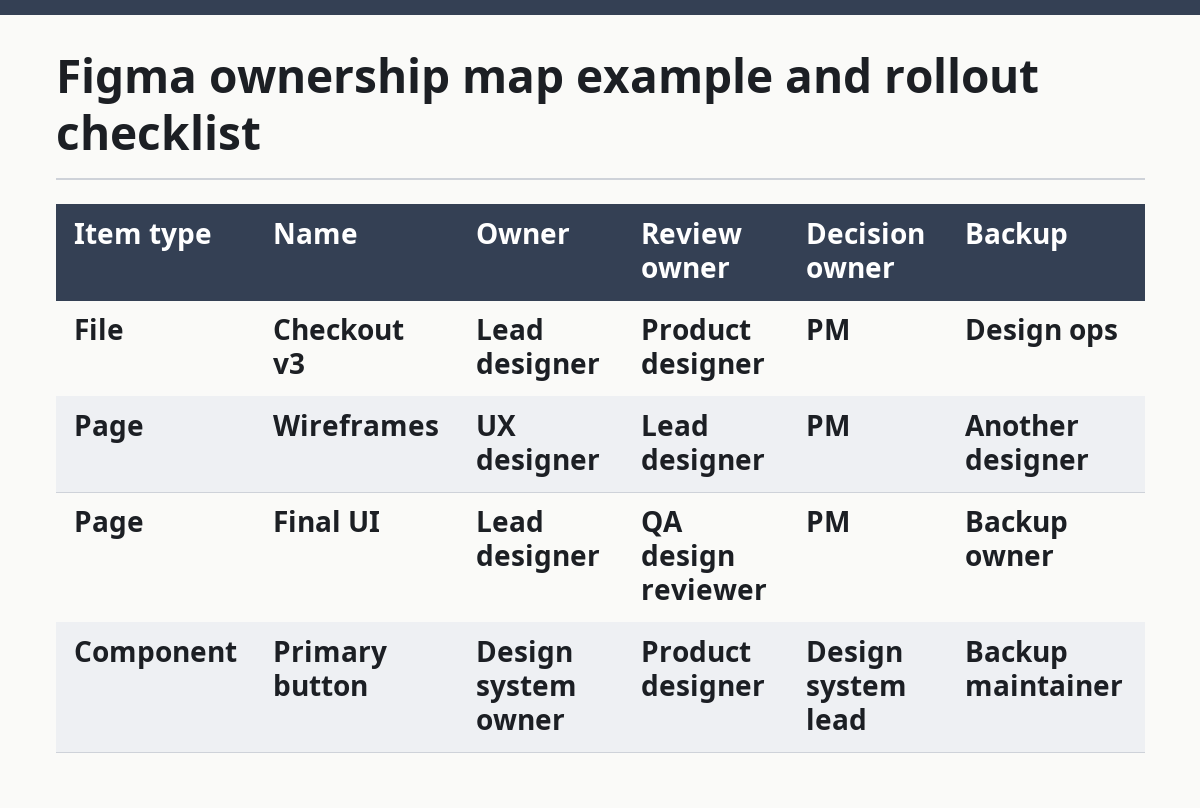
Use this sample structure:
| Item type | Name | Owner | Review owner | Decision owner | Backup |
|---|---|---|---|---|---|
| File | Checkout v3 | Lead designer | Product designer | PM | Design ops |
| Page | Wireframes | UX designer | Lead designer | PM | Another designer |
| Page | Final UI | Lead designer | QA design reviewer | PM | Backup owner |
| Component | Primary button | Design system owner | Product designer | Design system lead | Backup maintainer |
Then do a 15-minute rollout check:
- Does every active file have one owner?
- Does every page have a named person?
- Do shared components have a clear change path?
- Are review and decision roles separate where needed?
- Is the map easy to find from the file?
If the answer is “no” to any of those, fix that gap before the map spreads. A weak map copied across 20 files just creates 20 places to look lost.
For a fuller setup across product work, see the hub guide to Figma for Product Teams — the complete guide. This page is the piece that keeps ownership from getting fuzzy.
Who should own a figma file?
The file should be owned by the person responsible for keeping it current, organized, and easy to hand off. That is usually the lead designer, design systems owner, or product designer closest to the work. It should not default to whoever made the last edit, since that changes too often.
How do you assign ownership for shared components?
Assign ownership to the person or team that can change the component safely and keep its use consistent across files. Shared components should also have a review owner and a backup contact so changes do not stall when someone is out. If the component affects many files, avoid naming a whole team without one clear person attached.
What should be documented in a Figma ownership map?
Document the file name, page owner, component owner, review owner, decision owner, backup contact, and last-updated date. It also helps to note each page’s purpose and whether it is active, draft, or archive. The goal is to answer “who handles this?” in one glance.
Drafted with AI; not yet reviewed by a person.