
Last updated: November 18, 2026
Quick Answer: Keep a component local in Figma when it is still changing, tied to one project, or meant to stay experimental. Publish it to a library when other files need the same pattern, the naming is stable, and versioning is cheaper than rebuilding by hand. That is the core decision in Figma Libraries vs Local Components: When to Keep a Component Private.
I write about design systems and Figma file architecture for teams that have to decide what belongs in a shared library and what should stay private. The distinction is usually called Figma component scope. It is the real decision behind libraries vs local components.
Key takeaways
- Local components are the safer default for anything still in flux, because they can change without affecting other files.
- Shared libraries win when reuse is broad, the pattern is stable, and the team can absorb publishing, approval, and version management.
- A component should usually stay private if it is prototype-only, tied to one product bet, or likely to be replaced within a few sprints.
- Publishing too early creates design debt: other files start depending on a pattern before it has settled.
- The right question is not “Can this be shared?” but “What breaks if this changes tomorrow?”
The real difference between shared libraries and local components
Shared libraries win for consistency. Local components win for speed and control. A library turns a component into an upstream dependency for multiple files, while a local component stays inside one file and can move fast without ripple effects.
That difference matters more than the label. A local component can still be perfectly reusable inside a single project file, and a shared component can still be a bad fit if the pattern is unstable. Figma libraries are designed for publication and reuse across files. Local components stay tied to file ownership, so the person or team running the file can change or delete them without lining up a wider rollout.
Versioning is where the trade-off gets real. Once a component is published, one update can touch more than one team — handy for a button or form field, but painful for an experiment that may vanish next week. A local component keeps that blast radius small. It also keeps the library from filling up with half-finished patterns. That clutter gets ugly fast because nobody trusts a noisy catalog.
One useful rule: if another designer would be upset to see the component disappear or change shape, it is probably shared-library material. If the only people who care are on the project itself, keep it local until the pattern earns broader use.
For the file-architecture side of this decision, the hub on [Figma component and file architecture] can do the bigger organizing job; this page stays with the scope call itself.
When a component should stay private in Figma
A component should stay private when its main job is exploration, not reuse. Prototype-only pieces, one-off campaign UI, early product experiments, and any pattern that might be dropped before the quarter ends all belong in that bucket.
Teams usually over-publish here. A new card, modal, or filter bar looks polished enough to share, so it gets promoted too soon. Then three files depend on it, and the team discovers that the spacing, copy rules, or interaction model still need to change. Suddenly you are stuck with awkward backward compatibility or a rushed library edit that forces everyone to clean up later. Ugly little domino effect.
Keep it local if the component has any of these traits:
- It is tied to a single roadmap bet, such as a beta onboarding flow or a short-lived feature flag.
- Its behavior is still being tested through design critiques or product review cycles.
- It contains content, spacing, or interaction rules that will likely change after stakeholder feedback.
- It exists to support a specific file owner, not a shared workflow.
A local component is also the better choice when the team needs to move before the system is ready. If a product designer is making a 20-screen flow in one Figma file, local components can keep the work coherent without forcing a premature library decision. The downside is obvious: duplication becomes easy, and the same pattern can split into three slightly different versions. That trade-off is fine while the pattern is still being designed, but it is debt all the same.
Skip local-only components when the same pattern will appear in multiple products or when accessibility rules need to stay identical everywhere. In those cases, private ownership becomes a hidden cost.
Why shared libraries win for stable design system pieces
Shared libraries win for the parts of a design system that should not be reinvented in every file. Buttons, inputs, badges, navigational tokens, and other repeatable primitives usually belong here once the team has settled the pattern and can tolerate the publishing workflow.
The real strength of a shared library is governance, not just reuse. One published component gives the team a single place to adjust structure, naming, and defaults. That becomes especially useful when file ownership is split across product squads, because local copies drift quickly. Figma libraries cut down that drift by making the shared version easy to pull into any file.
But shared does not mean universal. A good library component has to survive multiple contexts without turning vague. If the pattern only works inside one feature or one layout size, publication may do more harm than good. The more specialized the piece, the more likely it is to become a brittle library asset that everyone works around.
The downside is governance overhead. Publishing means version discipline, documentation, and some coordination when changes break downstream work. It also creates a trust problem: if a library is packed with components that changed before they were ready, designers stop relying on it and start detaching instances. Once that happens, the system slips, and fast.
Use a shared library when you want the organization to answer the same UI question the same way, and when the answer has been stable enough to deserve that status. If the answer is still changing every sprint, shared components are too early.
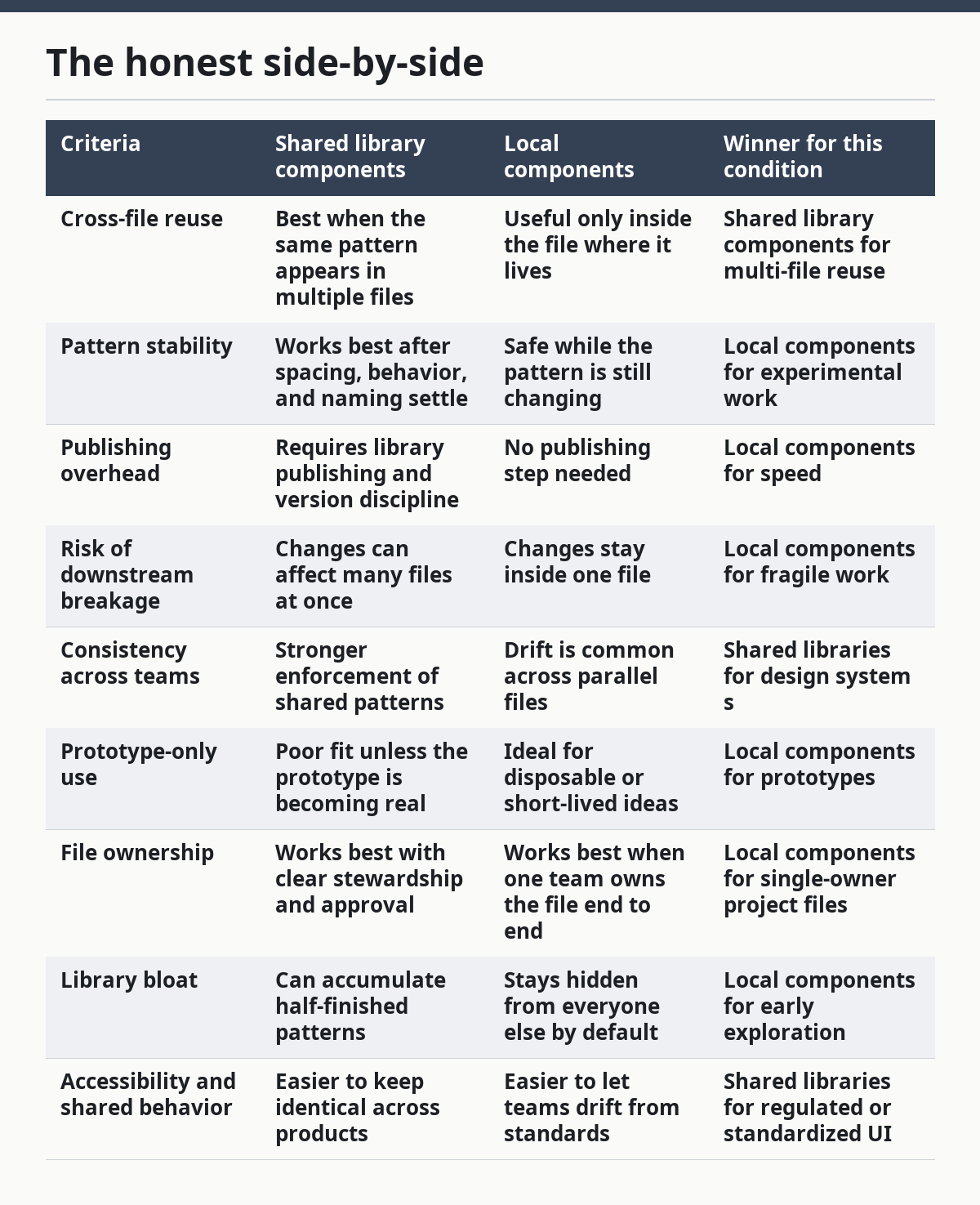
The honest side-by-side
Shared libraries and local components solve different problems, and the better choice changes with the level of stability, reuse, and ownership.
| Criteria | Shared library components | Local components | Winner for this condition |
|---|---|---|---|
| Cross-file reuse | Best when the same pattern appears in multiple files | Useful only inside the file where it lives | Shared library components for multi-file reuse |
| Pattern stability | Works best after spacing, behavior, and naming settle | Safe while the pattern is still changing | Local components for experimental work |
| Publishing overhead | Requires library publishing and version discipline | No publishing step needed | Local components for speed |
| Risk of downstream breakage | Changes can affect many files at once | Changes stay inside one file | Local components for fragile work |
| Consistency across teams | Stronger enforcement of shared patterns | Drift is common across parallel files | Shared libraries for design systems |
| Prototype-only use | Poor fit unless the prototype is becoming real | Ideal for disposable or short-lived ideas | Local components for prototypes |
| File ownership | Works best with clear stewardship and approval | Works best when one team owns the file end to end | Local components for single-owner project files |
| Library bloat | Can accumulate half-finished patterns | Stays hidden from everyone else by default | Local components for early exploration |
| Accessibility and shared behavior | Easier to keep identical across products | Easier to let teams drift from standards | Shared libraries for regulated or standardized UI |
Local components: who should actually use them
Local components win for teams that need autonomy more than consistency. That usually means a product squad working in a single file, an early-stage feature team, or anyone building a concept that may never reach the library.
The strength of local scope is simple: it keeps uncertainty cheap. If the component needs to change three times in one review cycle, there is no library permission step, no publication delay, and no risk that another file suddenly depends on yesterday’s version. That matters in discovery work, in prototype-only flows, and in any file where ownership is tightly held by one team.
The weakness is just as simple: local scope invites duplication. If the same empty state, onboarding card, or filter chip shows up in four files, local-only thinking creates four slightly different versions. Those differences can be hard to spot at first, but they can pile up into a messy design language. A local component also makes handoff harder if the file gets transferred to another team, because the pattern may never have been documented in the shared library.
Local components are the right fit when the project is expected to move quickly, when the component is not yet part of the design system, or when the cost of publishing exceeds the benefit of reuse. They are not the right fit for commonly used primitives, platform-wide navigation, or any pattern that must remain aligned across teams. If the component is already part of a stable product language, keeping it private usually just hides work that should be standardized.
Shared libraries: where they win and where they hurt
Shared libraries win when the team wants a component to become the default answer across files. That is the point of publishing: not just to store the component, but to make it discoverable, reusable, and maintainable as part of the system.
The strongest use case is a stable shared component that several teams will reference for months, not days. Think of common inputs, reusable cards, or interface patterns that must stay visually and behaviorally aligned. In that setting, library publication lowers the chance of accidental divergence and saves teams from rebuilding the same structure repeatedly.
The downside is that a library can freeze the wrong thing. If the component is published before the product decision is settled, every downstream file inherits the uncertainty. Version changes then become noisy, and designers may start detaching instances because the shared version is too rigid. Once people stop trusting the library, the system degrades fast.
Shared libraries also need clear ownership. If no one is responsible for approving changes, fixing names, and keeping the component documented, publication turns into clutter. A design system is not healthier just because more items are in it. It is healthier when the published components are the ones the team actually wants to standardize.
Use shared libraries when the component is part of the long-term UI contract. Skip them when the component is still a design question, not a design answer.
Exception scenarios that flip the verdict
Keep a component private most of the time, but there are a few cases where the verdict flips fast. When a pattern is already showing up in multiple active files, publish it even if it still feels slightly early; the coordination cost of keeping it local is usually higher than the cost of a controlled library update.
If the component is tied to accessibility behavior that must be consistent, shared scope is usually safer. A pattern with keyboard states, focus treatment, or other standardized interaction rules should be reviewed with accessibility guidance or a qualified professional before it stays private or becomes shared.
Should the team expect a component to become part of the design system within the next cycle, publishing early can be the cleaner move, as long as the owner accepts revision churn. That is especially true when the component is a primitive that many future patterns will build on.
And if the file is a temporary sandbox with no plan to reuse the work, keep everything local. Promoting throwaway experiments into the library just creates housekeeping work for the next person.
The verdict: which one to choose and why
Choose local components if the pattern is still experimental, owned by one file, or likely to change within the next few sprints. Choose shared library components if the pattern is stable, reused across multiple files, and part of the design system you want everyone to follow. Neither if you are publishing half-formed patterns just to feel organized.
That is the cleanest rule for Figma component scope. Local is the right default for uncertainty. Shared is the right investment for repetition. If a component still feels like a question, keep it private. If it already feels like a standard, publish it.
When to reconsider the choice entirely
Reconsider the choice when the component starts crossing file boundaries, because that is usually the first sign that scope has changed. A component that was safe to keep private in a single concept file may need publishing once two or more teams begin to depend on it.
Reconsider it again when ownership changes. If the original designer leaves the project, the private component can become a hidden dependency with no clear steward. At that point, a library copy may be the safer long-term home, even if the team keeps a local version for the current work. Version history and stewardship matter more than neatness.
A final trigger is pattern maturity. Once a component has survived at least one review cycle, has a clear name, and no longer changes shape every few days, it is no longer an experiment. That is the moment to decide whether it belongs in the library or should remain a project-specific exception.
FAQ
When should a component stay local in Figma?
A component should stay local when it is still being explored, belongs to one project file, or may be removed soon. That is especially true for prototype-only components and feature-specific UI. If the pattern is not ready for other files to depend on it, publishing only adds unnecessary maintenance.
Drafted with AI; not yet reviewed by a person.