
Last updated: November 19, 2026
Key Takeaways
- A good design handoff package contains only the build-ready facts the team needs.
- Product, design, and engineering collaborate well when they share decisions early and keep one source of truth for the feature.
- A strong design handoff is clear on screens, states, rules, and the few surprises that still matter.
- The biggest handoff mistakes are missing states, vague ownership, and last-minute scope drift.
Quick Answer

A strong design handoff and collaboration process gives product teams 4 essentials: a shared brief, clear states, named owners, and a documented change log. Design handoff breaks down when the team treats it like a file dump instead of a decision handoff. The fix is a shared process, clear ownership, and a definition of done that engineering can build from without guessing. For product teams, that usually means one source of truth, one review loop, and one final QA pass before release. Sources like the Nielsen Norman Group and the W3C recommend clear interaction details and accessible state definitions in product design workflows.
The sections below show what to hand off, who owns each step, and how to keep designers and product teams aligned.
What design handoff actually means in a product team
Design handoff means the team moves from exploration to build-ready decisions, not from “design finished” to “engineering on its own.” It is the point where a product team turns screens, states, rules, and edge cases into work that can ship without constant reinterpretation.
Picture this: you’ve got a finished Figma file, a product manager eager to move, and an engineer asking, “What happens when the field is empty?” That question is the whole job. The key here is buildable clarity — notice how the handoff includes behavior, not just visuals. This is what separates a clean transfer from a long string of Slack questions.
A useful handoff usually covers 4 things:
- The problem the feature solves.
- The intended user flow.
- The visual system and UI rules.
- The open edge cases and decisions still at risk.
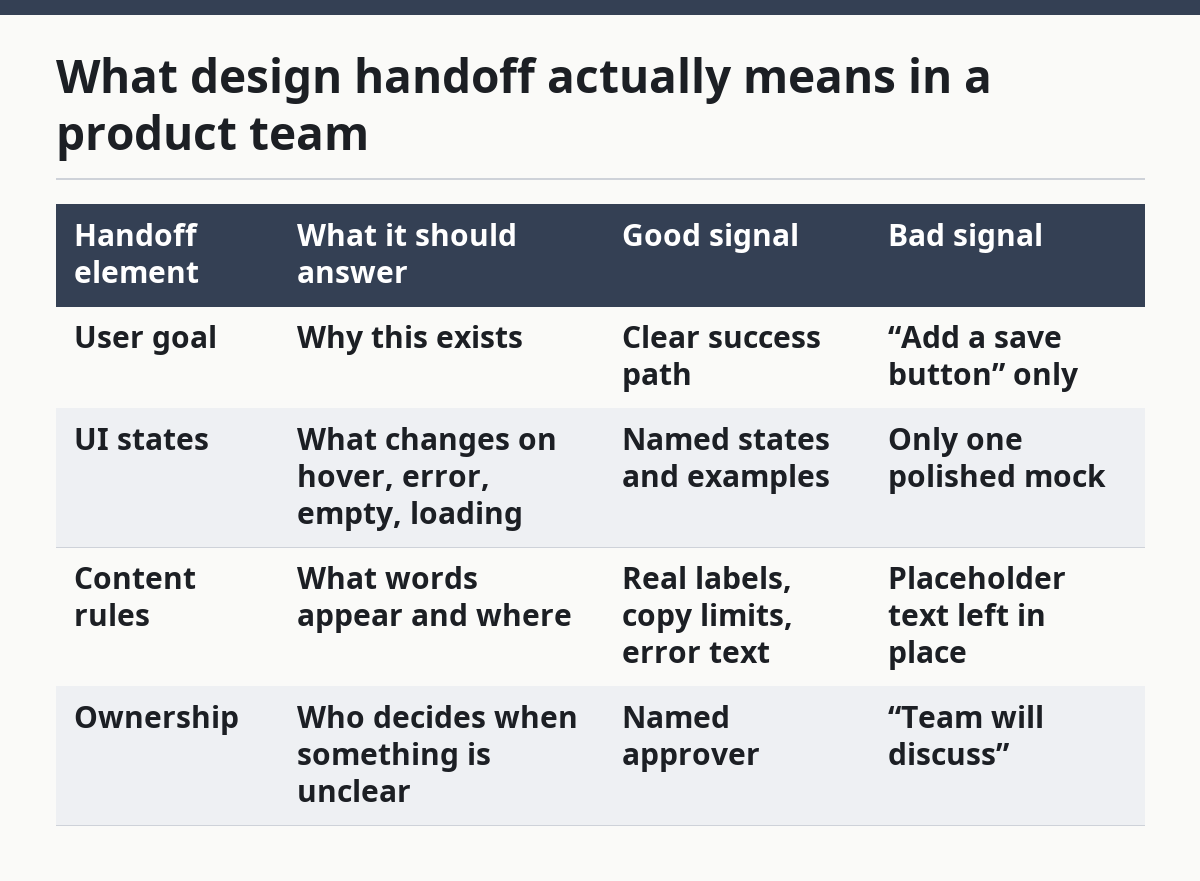
Therefore, a handoff is not a document type. It can live in Figma, Notion, Jira, or a spec doc, but the format matters less than whether the build team can answer “what, when, and why” without chasing people.
| Handoff element | What it should answer | Good signal | Bad signal |
|---|---|---|---|
| User goal | Why this exists | Clear success path | “Add a save button” only |
| UI states | What changes on hover, error, empty, loading | Named states and examples | Only one polished mock |
| Content rules | What words appear and where | Real labels, copy limits, error text | Placeholder text left in place |
| Ownership | Who decides when something is unclear | Named approver | “Team will discuss” |
One more point: a handoff is not complete just because the design looks polished. If the team still has to guess at behavior, it isn’t ready.
What should be in a design handoff package?
A good design handoff package contains the minimum build-ready facts, not every artifact the designer touched. The best packages are often short enough to scan in 10 minutes, and complete enough that engineering does not need a second meeting for basic answers.
For example, you can open the spec the day before implementation and see the journey, the states, and the rules on one page. That is the target. The key here is decision density — each item should remove a real question. If it does not, it’s noise.
Use this checklist as the handoff spine:
- State the user problem and the feature goal.
Check: does the team know what success looks like in the product, not just in the design file?
Do not: write vague goals like “improve onboarding.” - List the primary user flow.
Check: can someone follow the steps in order without reading your mind?
Do not: skip the “what happens next” step between screens. - Attach final screens and variants.
Check: are the common states, errors, empties, and confirmations visible?
Do not: hand off only the happy path. - Define responsive behavior.
Check: do tablet and mobile changes have rules, not just resized artboards?
Do not: assume the desktop layout will shrink cleanly. - Document content and copy constraints.
Check: are button labels, helper text, and validation copy final or clearly marked draft?
Do not: leave lorem ipsum in any user-facing field. - Name dependencies and open questions.
Check: can the team see what must be decided before build starts?
Do not: bury unresolved items at the bottom and hope they vanish.
The truth is, most failed handoffs are missing the same 3 things: states, rules, and ownership. If those are present, the rest becomes easier to read.
| Handoff item | Good practice | Common miss |
|---|---|---|
| Interaction states | Hover, focus, loading, error, disabled | Only default view |
| Content rules | Exact label and error text | “Use shorter copy” |
| Data dependencies | What API field maps to what UI element | “Backend will handle it” |
| Accessibility notes | Focus order, contrast, keyboard behavior | No mention at all |
A practical handoff also names the version date. Even a simple “finalized on 2026-11-04” is useful when a file has three branches, a QA build, and a stale export floating around. Version drift causes more rework than most teams admit.
How do product, design, and engineering collaborate without chaos?
Product, design, and engineering collaborate well when they share decisions early and keep a single source of truth for the feature. The team needs one place to see scope, one place to see states, and one owner for each open question.
Meanwhile, the PM may be trying to protect scope, the designer may be protecting usability, and the engineer may be protecting implementation time. That tension is normal. The key here is decision cadence — short, repeated check-ins beat one giant approval meeting. A 20-minute review can save a 2-day rebuild.
The collaboration model below is simple enough to use on a small team and strong enough to keep larger teams out of trouble:
- Start with the problem, not the pixels.
Check: does everyone agree on the user need before the first mockup?
Do not: debate color before the flow exists. - Review sketches or wireframes with product and engineering early.
Check: are the risky decisions visible while they are still cheap to change?
Do not: wait for a polished design to invite feedback. - Assign one decision owner per issue.
Check: when the team disagrees, is it clear who closes the loop?
Do not: leave every question to group consensus. - Record constraints as they appear.
Check: are API limits, legal copy, and platform rules listed in the spec?
Do not: rely on memory or a scattered Slack thread. - Run an implementation review before the build starts.
Check: does engineering know what is hard, what is simple, and what needs a new component?
Do not: assume feasibility from the mock alone. - Keep a change log during build.
Check: are scope shifts written down with a date and owner?
Do not: let “small tweaks” pile up invisibly.
Here’s the catch: collaboration fails when people treat disagreement as a process problem. Sometimes it is just a missing decision. Sometimes it is a real trade-off between UX, time, and system limits, so teams should consult a professional or their internal product lead when needed, and they can refer to product and UX collaboration guidance from the Nielsen Norman Group and Atlassian.
A good operating rule is this: if a question can be answered by a system rule, write the rule. If it needs judgment, name the judge. That sounds plain because it is plain. It also works.
This keeps the handoff from turning into a meeting marathon. The team spends more time building and less time re-litigating the same choice.
What does a build-ready design handoff look like?
A build-ready design handoff is clear on screens, clear states, clear rules, and very few surprises. If someone opens it at 9 a.m., they should know what to build by 9:10.
For example, compare a polished screen to a build-ready spec. The polished screen has spacing and color. The build-ready spec has exact states, fallback paths, and the behavior of each control. The key here is observable detail — not “the button is prominent,” but where it sits, what it says, and what happens when it is disabled.
Use this structure for every feature packet:
| Section | What to include | Example of correct detail |
|---|---|---|
| Summary | Goal, audience, success criteria | “Users can save a draft without publishing.” |
| Flow | Step-by-step interaction | Open form → edit fields → save draft |
| States | Default, hover, focus, error, empty, loading | Error state shows inline message under field |
| Rules | Validation, character limits, conditionals | “Title max 80 characters” |
| Assets | Icons, illustrations, media specs | SVG icon, 24 px grid |
| Dependencies | API, feature flags, permissions | Requires logged-in user |
| Open issues | Anything unresolved | “What happens after timeout?” |
A build-ready packet usually includes these 6 checks:
- The first screen and the final screen are both visible.
- Every field has a label, helper text, and error state if needed.
- Empty, loading, and success states are shown.
- Responsive behavior is described, not implied.
- Accessibility notes are listed where they matter.
- The owner of each open question is named.
One strong rule: if a state matters to the user, it should be shown. If it matters only to the team, it should still be written down. The size of the issue does not matter nearly as much as whether the team can find it fast.
What makes a handoff incomplete is not always missing art. Sometimes it is missing the system logic behind the art. That is why good teams keep the spec close to the product brief, not far away from it.
Which mistakes cause the most rework?
The biggest handoff mistakes are missing states, vague ownership, and last-minute scope drift. Those three create most of the rework because they force engineers to stop and ask questions after implementation has already started.
For example, a screen may be approved, the ticket may be in progress, and then someone notices there’s no error state for a failed upload. That is not a small miss. The key here is late ambiguity — the later a question appears, the more expensive it gets.
The most common mistakes look like this:
| Mistake | What it causes | Better move |
|---|---|---|
| Only showing happy path | Hidden edge cases during build | Add empty, error, and loading states |
| No ownership on questions | Slower decisions, more meetings | Name one decision maker per issue |
| Copy left unfinished | Rework in QA and localization | Finalize UI text before build |
| No responsive rules | Layout fixes late in sprint | Define breakpoints or behavior changes |
| No design QA step | Small mismatches ship | Schedule a review before release |
Here’s the catch: “Just ask me later” is not a process. It is a delay, and delays get expensive once code exists.
Use this 6-step triage when a handoff starts to wobble:
- Check the flow against the brief.
Check: does the build still solve the original problem?
Do not: let feature creep hide in minor tweaks. - Review every UI state.
Check: are disabled, empty, loading, and error states shown?
Do not: assume the default state is enough. - Confirm all copy.
Check: are labels, helper text, and alerts final?
Do not: leave placeholder text in the ticket. - Compare responsive behavior.
Check: what changes at smaller widths or different platforms?
Do not: use one desktop mock as the whole plan. - Resolve each open question.
Check: is there a named owner and due date?
Do not: keep “TBD” alive after kickoff. - Schedule design QA.
Check: will design review the build before release?
Do not: skip the last pass because the sprint is tight.
The truth is, rework often starts with a good intention: moving fast. But a 30-minute review before build is cheaper than a 3-hour repair after QA.
How do you keep collaboration healthy after the handoff?
You keep collaboration healthy after the handoff by staying in the loop through build, QA, and release—not by disappearing once the files are sent. The handoff is a handoff of responsibility, not a handoff of interest.
For instance, when the feature is under construction, the first build may reveal a spacing issue, a label that wraps, and a missing empty state. If design is gone, those become assumptions. The key here is fast feedback — small corrections early prevent large fixes later.
A healthy post-handoff rhythm often includes:
- A kickoff review before implementation.
- One design check-in during build.
- A QA pass against the spec.
- A release review for anything that changed.
The team should also keep a short change log. Even a simple list of “changed after approval” with dates and owners helps prevent confusion when someone asks why the shipped version differs from the mock.
A useful practice is to mark decisions in three buckets:
- Locked: cannot change without formal review.
- Flexible: can shift if the build needs it.
- Open: needs a decision before release.
That tiny label system cuts through a lot of noise. It also makes trade-offs visible. If a change is flexible, say why. If it is locked, say who locked it.
Ultimately, this keeps trust intact. Designers stop feeling edited out. Engineers stop feeling trapped by late changes. Product stops acting like the only job is to close tickets. Everyone can see the same page.
How do you measure whether handoff and collaboration are working?
You measure handoff quality by watching for fewer surprises, fewer late changes, and fewer questions that should have been answered before build. The right metric is not “how many files were shared,” but “how often did the team need to backtrack?”
For example, if a sprint ends and QA has half a dozen issues that were visible in the design spec from the start, the process failed upstream. The key here is preventable churn — every repeated question is a process leak.
A practical review scorecard can be simple:
| Signal | Good sign | Warning sign |
|---|---|---|
| Build questions | Few, specific, early | Many, vague, late |
| Design changes | Small and tracked | Frequent and unlogged |
| QA defects | Match known risks | Surprise issues on basics |
| Team confidence | Clear ownership | “Who decides?” loops |
| Delivery pace | Stable after kickoff | Stops and restarts |
Use this checklist after each feature:
- Count how many questions appeared after build started.
Check: did they concern edge cases or basic flow?
Do not: treat repeated basics as normal. - Review how many changes were made after approval.
Check: were they recorded and owned?
Do not: let silent edits accumulate. - Compare QA issues to the spec.
Check: were problems visible before coding?
Do not: confuse avoidable misses with normal bugs. - Ask each role where the process slowed down.
Check: do product, design, and engineering point to the same weak spot?
Do not: let each function blame a different step. - Update the handoff template after release.
Check: did the team learn something repeatable?
Do not: keep the same template if it no longer fits.
On the flip side, perfect handoff is not the goal. The goal is a process that catches issues before they become expensive and keeps decisions visible when they do.
A useful standard to borrow is the idea of a “definition of ready” before build and a “definition of done” before release. Many product teams use those terms loosely, but the habit matters: no work starts until the team can point to the missing pieces. That one discipline changes the whole pace.
What should a team use as its handoff standard?
A team should use a handoff standard that fits its size, tools, and release speed, then apply it the same way every time. The standard is not a long manual. It is a short list of required artifacts and decision rules that every feature must meet.
For the next feature, the process is already familiar. Everyone knows where the flow lives, where the states live, and who signs off on open issues. The key here is repeatable structure — the team does not have to invent the process every time.
A lightweight standard can look like this:
- One feature brief.
- One flow map.
- One set of final screens.
- One list of states and rules.
- One owner for unresolved questions.
- One QA pass before release.
That may sound plain. Good. Plain is easier to keep up.
| Standard rule | Why it matters | Example |
|---|---|---|
| Every screen has states | Prevents build gaps | Loading, empty, error |
| Every question has an owner | Speeds decisions | PM, design, or engineering |
| Every release gets QA | Catches drift | Visual and behavior review |
| Every change is logged | Preserves context | Date, reason, approver |
A team standard should also say what not to do. For example, do not freeze a feature if the team still lacks a required dependency. Do not move into build if the core flow is still under debate. Do not treat a polished mock as proof that the implementation plan is ready.
The truth is, strong collaboration is less about talent than discipline. Good teams make fewer guesses because their design handoff process forces the hard questions into the open.
FAQ
What is the difference between design handoff and design review?
Design handoff is the transfer of build-ready decisions, while design review is the feedback step before or during that transfer. Review helps shape the work; handoff packages it for implementation. If the team still needs to debate core flow, it is review time, not handoff time.
Who owns design handoff in a product team?
Design usually prepares the handoff, but product and engineering share ownership of the result. The designer often maintains the visual and interaction details, the PM protects scope and goals, and engineering confirms feasibility. The team works best when one person owns each unresolved decision.
What should be in a design handoff checklist?
A strong checklist includes user goal, flow, states, copy, responsive behavior, dependencies, and open questions. It should also name the version and the owner for anything unresolved. If a checklist cannot answer what changes, when, and why, it is too thin.
How can small teams do handoff without heavy process?
Small teams can use a short, shared template and one live review before build. The process should stay light, but it still needs states, rules, and ownership. A simple document with the right details beats a huge spec nobody reads.
What is the biggest sign of a bad handoff?
The biggest sign is when engineers keep asking questions the design already should have answered. Missing states, unclear copy, and no owner for decisions are the usual causes. If QA keeps finding issues that were predictable, the handoff process needs work.
Drafted with AI; not yet reviewed by a person.