Last updated: November 20, 2026
Quick answer: A solid Figma handoff package for engineering and QA usually centers on 5 core items: design specs, redlines, exported assets, acceptance criteria, and QA references. This guide shows how to create a Figma handoff package for engineering and QA so the same file can support build work and testing without extra explanation. If that package is complete, developers spend less time guessing and QA has a clear source of truth.
Key takeaways
- Put every screen’s measurements, states, and asset exports in one place instead of scattering notes across comments.
- Treat the package as a delivery item, not a clean-up task at the end of design; if the handoff is unclear, consider consulting a product designer or design systems specialist before release.
- Include QA references for edge states, empty states, and error states, or the team will invent them later.
- Use one export rule for icons, illustrations, and images so engineering does not chase three different file types.
- Leave out work that belongs in product decisions, not in a handoff file.
What belongs in the package?
A Figma handoff package should include the design file view, spec notes, redlines, exported assets, acceptance criteria, and QA references. That mix gives engineering enough detail to build and gives QA enough context to check the result against the intended state of the screen.
The package is not the same thing as a tidy Figma file. A tidy file may still leave out the numbers that matter: spacing, sizes, responsive behavior, copy for empty states, or which asset version should ship. If the package is missing one of those parts, the team will fill the gap in chat, and that is where mistakes start.
A useful package usually answers five questions on its own: What is this screen supposed to do? What should the layout measure? What assets are needed? What changes between states? What does “done” mean for QA? That is the level of detail that keeps the handoff usable after the call ends.
It helps to think in terms of the job each artifact does. Design specs explain the layout. Redlines make spacing visible. Exported assets give engineering the exact files to use. Acceptance criteria tell QA what success looks like. QA references point to the states and variants that need checking, including the 2 or 3 edge cases that are easy to miss.
If the package is aimed at engineering and QA, it should not try to solve product strategy, brand governance, or every open design debate. Those belong elsewhere. A handoff package works best when it is narrow enough to act on in the same day.
How do you build it step by step?
You build it by freezing the deliverables in Figma, attaching the supporting notes, and checking that every screen can be built and tested without extra explanation. The order matters because each step removes a different source of guesswork.
- List the screens and states. Start with the main flow, then add any loading, empty, error, and success states. A package with 6 screens and only 2 states looks complete until QA asks what happens on failure.
- Add design specs to each frame. Record spacing, text styles, size rules, and component names directly where the frame lives. A developer should not have to hunt through 12 comments to find one margin value.
- Mark redlines for the parts that matter. Use them on the layout details that are easiest to misread, such as alignment, padding, and icon placement. Redlines are not decoration; they can help prevent a 1-pixel argument from turning into a rework cycle.
- Attach export settings for every asset. Label the file type, scale, and target use for each exported item. If an image is meant for a 2x display and an icon is meant to stay crisp at small sizes, that needs to be obvious before export, not after.
- Write acceptance criteria in plain language. Keep each item tied to one observable result. A criterion like “the save button stays disabled until required fields are filled” is far better than a vague note about usability.
- Add QA references beside the screens. Link the exact frame or variant QA should check, and note any state that needs manual review. That is what turns the handoff into a testable package instead of a read-only album.
This workflow matches the way engineering and QA actually use the file: they need to move from screen to implementation to check without stopping to ask what the package meant. The more direct the path, the fewer clarifying messages land in the middle of build work.
The one trap here is overpacking the file with every thought behind the design. A handoff package should not become a diary. If a note does not help engineering build or QA verify, it should stay out.
What do engineering and QA need to see?
Engineering and QA need the details that affect implementation and verification, not the whole design debate. The handoff should answer what gets built, what changes by state, and what counts as a pass.
For engineering, the most useful details are the design specs, component references, exported assets, and any behavior that changes by breakpoint or variant. If the package contains a button at 1 size but the real product needs 3 states, the implementation will drift. The team should not have to infer hover, disabled, or error behavior from a static frame.
For QA, the most useful details are acceptance criteria, state coverage, and the exact reference frames for each test case. A QA reference should make it obvious which version is expected, especially when there are alternate states or alternate copy lines. Without that, testing becomes a comparison against memory instead of against the file.
A clean way to separate the two is to ask one question for each artifact. Does this help someone build it? Does this help someone check it? If the answer is no to both, it probably does not belong in the package.
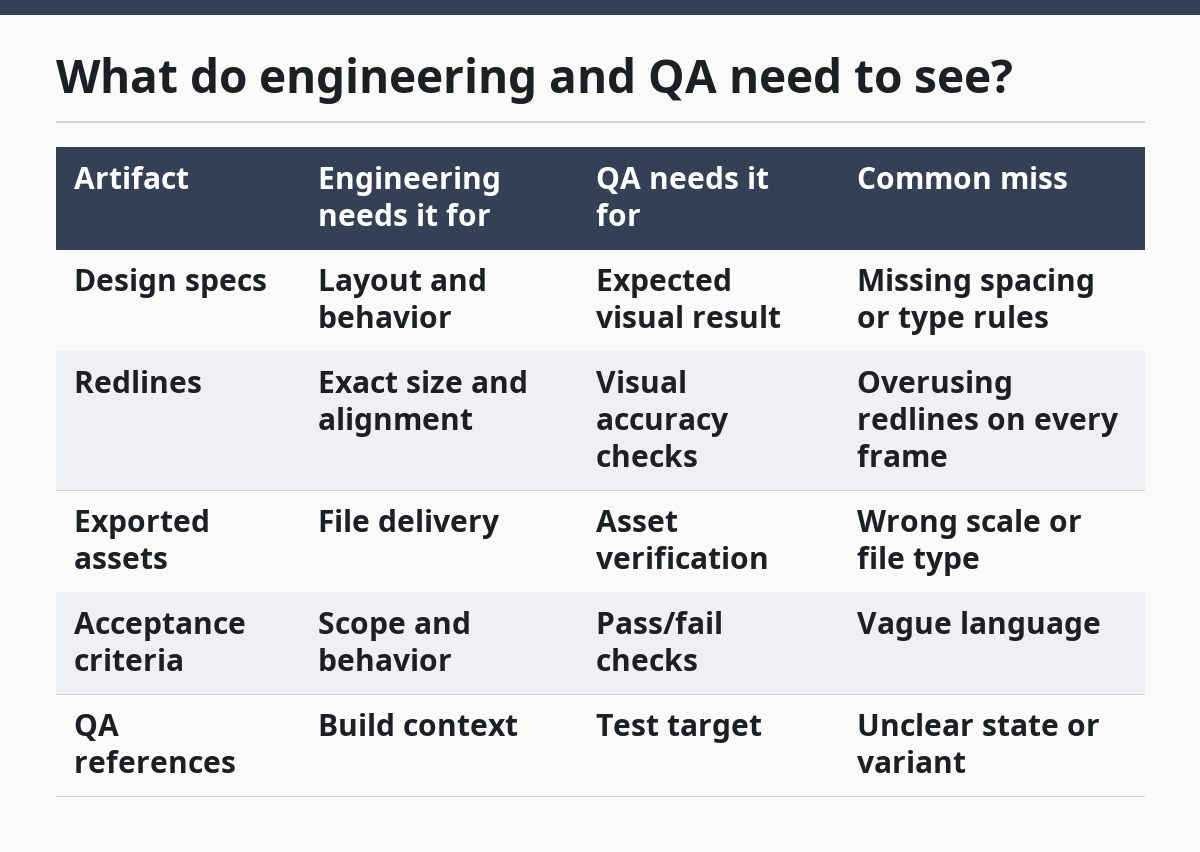
Here is a simple comparison that helps decide what to include:
| Artifact | Engineering needs it for | QA needs it for | Common miss |
|---|---|---|---|
| Design specs | Layout and behavior | Expected visual result | Missing spacing or type rules |
| Redlines | Exact size and alignment | Visual accuracy checks | Overusing redlines on every frame |
| Exported assets | File delivery | Asset verification | Wrong scale or file type |
| Acceptance criteria | Scope and behavior | Pass/fail checks | Vague language |
| QA references | Build context | Test target | Unclear state or variant |
The package gets weaker when it tries to impress instead of inform. A developer does not need a polished presentation; they need the numbers and files that prevent a second round of questions.
How should you handle spec notes, redlines, and exports?
Spec notes, redlines, and exports should each do one job and avoid overlap. When each artifact has a single purpose, the package is easier to scan and less likely to conflict with itself.
Spec notes are for rules that do not show up clearly in the frame. That includes text limits, state changes, spacing exceptions, and component behavior. A note like “title truncates after 2 lines” is concrete; a note like “keep it balanced” is not useful to engineering or QA.
Redlines are for measurable differences that matter during build. Use them where the risk of misreading is high, such as padding, alignment, or a 4 px offset that changes the look of a card. If every surface gets redlined, the useful parts disappear in noise. Reserve them for the places that would hurt most if they were built wrong.
Exports should be named and grouped with intent. A file called icon-final-v3 can still confuse a handoff if no one knows whether it is meant for the toolbar, the modal, or the mobile header. Use the package to make the export’s purpose obvious before engineering downloads it.
The trade-off here is time. Clean notes, redlines, and exports take longer than dumping assets into a folder. The payoff is fewer clarification loops and less rework, especially when the handoff feeds both engineering and QA.
A practical rule helps: if a person could misread it in under 30 seconds, annotate it. If a person still cannot act on it after that, the note may need to be rewritten rather than added.
What mistakes cause the most rework?
The biggest mistakes are missing states, vague acceptance criteria, and exports that do not match the design file. Those three problems create most of the churn because they force engineering and QA to guess.
Missing states cost time because the team has to invent what happens when data is empty, invalid, or delayed. A screen that looks fine in its main state can still fail in an error state. If the package covers only the happy path, the gap shows up late, usually during QA or just before release.
Vague acceptance criteria cost even more because they cannot be checked cleanly. “Make it user-friendly” does not tell QA what to inspect. “Submit button stays disabled until all required fields are filled” does.
Export mismatches are another common source of trouble. A 1x icon saved where a 2x asset is needed, or an illustration exported in the wrong format, can slow implementation by a full round of correction. The package should state the export rule close to the asset itself so no one has to infer it from memory.
A fourth mistake is hiding too much context in comments. Comments are easy to miss once the file grows. If the detail matters to build or test, it belongs in the handoff package where the team expects to find it.
This is also where the package is not for everyone. It is not for teams that still need open product discussion on every screen. If the design is unstable, a handoff package will just freeze the wrong version faster.
Where does QA fit in the package?
QA fits into the package by getting direct references to the expected state, not a separate summary after the fact. The package should make QA faster from the first test case, not after a handoff meeting.
That means the QA references should sit beside the screen or variant they belong to. A good reference points to the exact frame, says which state to inspect, and names the behavior that must be present. If QA has to ask whether a failure state should exist, the package was not complete.
A useful habit is to write acceptance criteria in a way that can be checked in under a minute. QA does not need a paragraph on intent when one line of observable behavior will do. The cleaner the criteria, the easier it is to trace a defect back to a missed spec or a wrong asset.
Because that comparison depends on the source file, the package should also make it easy to compare build output against the source. That comparison is why redlines and specs live next to the frame rather than in a separate document. QA can confirm the visual result without hunting for the right file.
For broader workflow context, this topic sits under the Figma design workflows hub, where handoff is one part of a larger design-to-build process. The handoff package is the piece that carries the work across the line.
What should a good final check catch?
A good final check should catch missing files, missing states, and mismatched notes before the package is shared. That check can be done quickly if the package is organized by screen and not by random file type.
Look for three things first: every required asset is exported, every major state has a reference, and every acceptance criterion can be read without a follow-up question. If one of those is missing, the package is not ready, even if the main layout looks polished. A polished file with an incomplete spec still sends work back to the team.
The final pass should also check for contradictions. If the redline says one spacing value and the note says another, the package now contains two truths. That is worse than missing a note because it creates uncertainty instead of clarity.
One more check matters for the team using the package later: can someone open it a week from now and still understand what shipped? If the answer is no, the package depends too much on live explanation. A solid handoff package survives after the meeting ends.
A Figma handoff package earns its keep when it reduces questions, not when it looks finished. That is the standard to use before it leaves design and reaches engineering and QA.
What should be included in a figma handoff package?
A Figma handoff package should include design specs, redlines, exported assets, acceptance criteria, and QA references. Those pieces give engineering the numbers and files needed to build, and they give QA a clear target for checking the result. Without all five, the package usually turns into a partial handoff.
How do you hand off a design for qa?
You hand off a design for QA by pairing each screen with a testable reference and a pass/fail rule. The reference should point to the exact frame or variant, and the rule should describe what QA should observe, such as a disabled button, an error state, or a required asset. That keeps testing tied to the design, not to memory.
What context do developers need from figma?
Developers need the measurements, states, exported assets, and behavior rules that affect implementation. They do not need every design debate, but they do need the details that stop guesswork, such as spacing, asset format, and how the screen behaves in edge cases. The more direct that context is, the fewer correction cycles the build usually needs.
Sources
- Figma Help Center: https://help.figma.com/
- Nielsen Norman Group: https://www.nngroup.com/articles/design-handoff/
- Interaction Design Foundation: https://www.interaction-design.org/
Drafted with AI; not yet reviewed by a person.