Last updated: November 20, 2026
Use separate Figma pages for discovery, production design, handoff assets, and archive so each stage stays easy to find and hard to confuse. A clean page structure makes the file faster to scan, reduces wrong edits, and gives each workstream a clear home without changing your component setup.
Key takeaways
- Give each page one job, not three.
- Put messy exploration in one place, polished screens in another, and handoff material in a third.
- Keep archive pages in the same file only when the old work still helps the current team.
- Use short page names that match how people talk in standups and reviews.
- Move finished work out of the active pages before the file turns into a long scroll.
What does a good Figma page structure look like?
A good Figma page structure is one that lets someone find the right work in under a minute. That usually means four page roles: discovery, production design, handoff assets, and archive.
The point is not to build a perfect library of pages. The point is to keep each stage from bleeding into the next. Discovery work often changes fast and may include 3 to 10 rough branches of an idea; production design should hold only the version that is moving toward release; handoff assets should be the clean source for specs and developer review; archive should hold old material that still matters, but no longer belongs in the active path.
A generic article often gets this wrong by treating every page like a folder. Figma pages are not storage bins. They are working surfaces, and the team scans them during reviews, handoff, and updates. If a page name does not tell a person what stage they are in, the file becomes slower to use within a week.
The cleanest structure is simple enough to read at the top of the left rail. If a page takes more than one glance to understand, it is already too vague.
Which page roles should each file have?
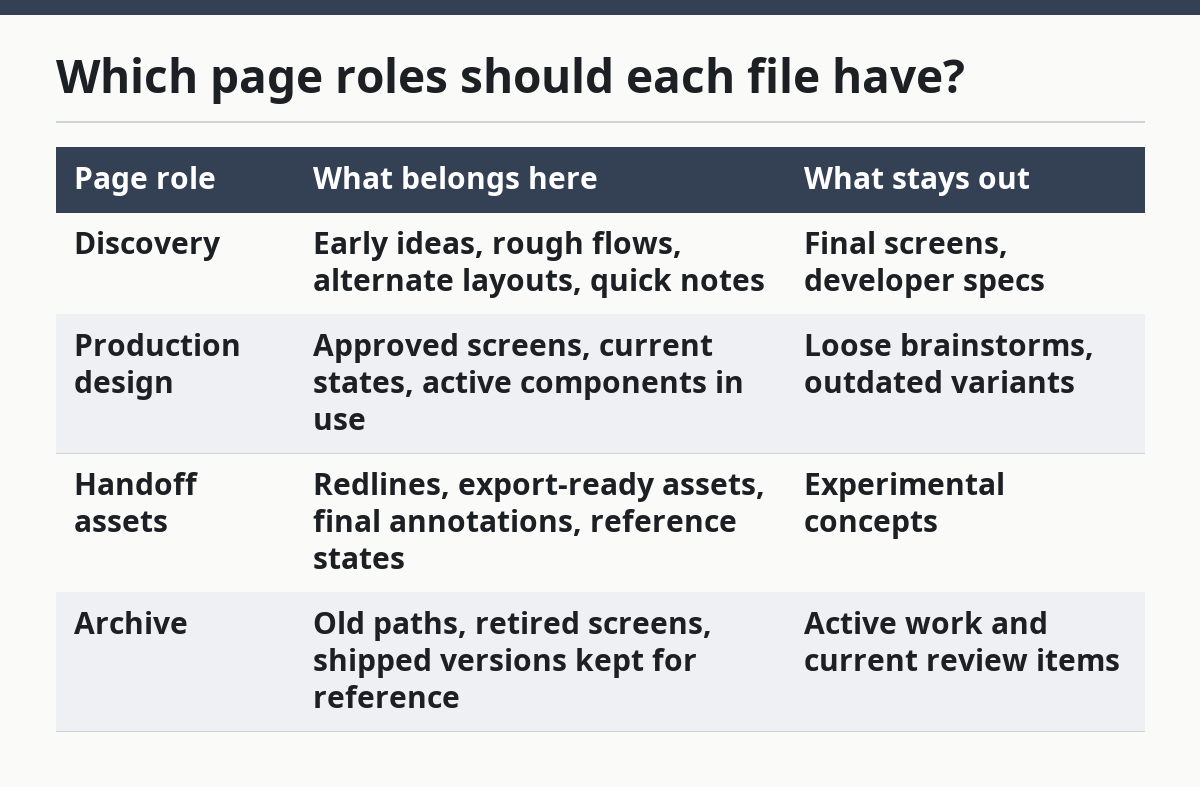
Each file should have one page for discovery, one for production design, one for handoff assets, and one for archive. That split gives every stage a visible home and keeps rough work from sitting beside final screens.
Here is the simplest way to think about the roles:
| Page role | What belongs here | What stays out |
|---|---|---|
| Discovery | Early ideas, rough flows, alternate layouts, quick notes | Final screens, developer specs |
| Production design | Approved screens, current states, active components in use | Loose brainstorms, outdated variants |
| Handoff assets | Redlines, export-ready assets, final annotations, reference states | Experimental concepts |
| Archive | Old paths, retired screens, shipped versions kept for reference | Active work and current review items |
Discovery pages are for speed, not polish. A designer should feel free to create several branches, compare them, and delete dead ends without worrying about cleanup on the same day. Production pages should hold the version that is being checked, reviewed, and updated.
Handoff assets belong on a page that is boring in the best way. Developers and reviewers should not have to hunt through a dozen frames to find the approved set. Archive pages should stay readable, but they should stop competing for attention with current work.
This structure is not for teams that want every artifact in one giant page. If the file is tiny, or if the project is a one-off with only a few frames, four pages can be too much overhead. In that case, keep the same roles, but use fewer pages and make the names very clear.
How do I set up the pages in order?
Set up the pages in the order people use them during a project: discovery first, production design second, handoff assets third, archive last. That order matches the path a screen usually takes from idea to release.
Use this core procedure:
- Create the discovery page and place all early concepts there, including rough branches and discarded directions. The result is one place for loose work, so nobody mistakes it for final design.
- Create the production design page and move only the current approved direction onto it. The result is a cleaner page that can support review without extra noise.
- Create the handoff assets page and copy or move the final states, annotated frames, and export-ready items there. The result is a page that developers can check without scrolling through drafts.
- Create the archive page and move retired work there in batches, not one frame at a time. The result is less clutter on active pages and easier lookup later.
- Rename each page with plain labels your team already uses, such as Discovery, Production, Handoff, and Archive. The result is a file that reads the same way for design, product, and engineering.
This order works because it follows the life of the work. A frame should not have to travel backward through the file to become useful. If a review cycle takes a day or a week, the page structure should still make sense when someone returns to the file after a break.
The best page names are short and exact. Avoid clever labels that mean something only to the person who made them. A name like “Ideas v2” tells a future reader very little. “Discovery” tells them the stage in one word.
What should go on handoff pages?
Handoff pages should contain only the material that helps another person build the design correctly. That usually includes final frames, export-ready assets, and the annotations that explain states, spacing, or behavior.
Keep the page narrow. If a handoff page starts collecting alternate concepts, the developer or reviewer has to guess which frame is real. A page with 8 final frames is easier to trust than a page with 8 final frames mixed with 20 drafts.
Use the handoff page as a filter. If a frame still needs design debate, it belongs in production design or discovery. If a frame is final but not needed for build, it may not need to be on the handoff page at all. The page exists to reduce search time, not to showcase every idea in the file.
This is also the place where page separation pays off the most. When handoff assets sit beside discovery sketches, teams often duplicate the wrong frame or annotate the wrong state. A separate page lowers that risk because the page itself already signals “this is the version that matters.”
A common mistake is to treat handoff as a phase you add at the end, like a label slapped on the whole file. That costs time in review because the person checking the file has to sort good frames from rough ones. A dedicated page does that sorting once.
How should archive pages be handled?
Archive pages should hold retired work that may still be useful, but not active work that needs attention today. That means old flows, released screens, and abandoned directions can live there as long as they no longer pull focus from current design.
The archive page should be quiet and predictable. If a team keeps the archive in the same file, it should be named plainly and kept out of the main review path. If the archive starts getting weekly edits, it is no longer an archive; it is a second production page with a different label.
A useful rule is to move material to archive in batches after a milestone, not every time a frame feels old. That keeps the active pages stable. It also prevents the left rail from becoming a long list of nearly identical page names.
Archive is not the place for ambiguous leftovers. If nobody knows why an item is there, it belongs either back in production design or out of the file. A strong archive keeps history without making the file harder to use.
This is the one area where many teams overdo cleanup. They spend time curating archive pages that no one needs to inspect. A better standard is simple: can a teammate understand why the item was kept in 30 seconds? If not, the archive has become clutter too.
Which page setup is better for small teams?
The better setup for a small team is the one that makes page changes cheap enough to keep using it. That usually means fewer pages, but not fewer roles.
| Team size or file type | Page setup | Why it helps |
|---|---|---|
| Small project | 3 pages: Discovery, Production, Archive | Less scrolling, less setup |
| Ongoing project | 4 pages: Discovery, Production, Handoff, Archive | Clearer review and release path |
| Fast-moving team | 4 pages with strict page names | Fewer mistakes during handoff |
| Tiny one-off file | 2 pages or 3 pages | Less overhead than a full structure |
The trade-off is real. More pages create clarity, but they also add maintenance. If a file only has a few frames and one reviewer, four pages may feel heavier than needed. If the team is larger, or if the file stays active for weeks, the extra page separation usually pays for itself.
This structure is not for teams that already rely on a different ownership map or a heavy component system and want the page list to carry all that meaning too. Page structure should support the workflow, not replace every other organizing tool in the file.
When the team begins to ask, “Which page is the real one?” the structure has failed. The answer should be obvious from the page name and the kind of content on the page.
What mistakes cost the most time?
The mistakes that cost the most time are mixing stages, naming pages vaguely, and leaving obsolete work in the active area. Each one forces people to spend extra minutes sorting instead of designing or building.
Mixing discovery and production is the biggest drag. A team may lose 10 or 15 minutes in a review just deciding which frame is current. The fix is simple: move rough branches off the production page as soon as the chosen direction is clear.
Vague names cause a slower version of the same problem. “Misc,” “Stuff,” and “Old” do not tell anyone where to look. Use names that match the job of the page, even if the title feels plain.
Leaving archive items beside active screens is another common trap. Old work becomes visual noise, and noise makes people miss the frame they need. If a page is not needed in a live review, move it out of that path.
A final mistake is over-separating pages so much that the file becomes a maze. If a person needs a map to find basic work, the structure has gone too far. The goal is faster discovery, not page sprawl.
How do I keep page structure from drifting?
Keep page structure from drifting by reviewing it at each milestone, not only at the end. A 5-minute check after a key review is often enough to spot pages that have become mixed or stale.
The test is simple. Discovery should still look exploratory, production should still look current, handoff should still look final, and archive should still look quiet. If one of those pages stops matching its role, move the content before the page turns into a catchall.
This is where Figma page structure helps teams that also follow broader design workflow guidance. The Figma design workflows hub can support the bigger process, while the page structure keeps the file itself readable.
A clean structure does not need constant rebuilding. It needs a few firm rules, used the same way every time. Once the team learns those rules, the file becomes easier to scan in 10 seconds instead of 10 clicks.
How many pages should a Figma file have?
A Figma file should have as many pages as it needs to separate stages, and no more. For many teams, that means 3 or 4 pages: discovery, production, handoff, and archive.
The better question is not the count but the job each page does. If two pages keep serving the same purpose, one of them is probably redundant. If one page is holding three stages, it is probably doing too much.
What is the best way to separate discovery and production work in Figma?
The best way to separate discovery and production work in Figma is to give them different pages and different standards for what can stay there. Discovery can hold rough branches, while production should hold only the current approved direction.
That split cuts down on accidental edits and wrong assumptions. It also makes review faster because the team does not have to sort exploratory work from final work.
Should archived work stay in the same file?
Archived work should stay in the same file only when the team still needs regular access to it. If the old screens are useful for reference, a separate archive page can be the right choice.
If archived work is still getting edited or confused with current work, it is not really archive anymore. In that case, the page structure needs a cleanup before it causes more slowdown.
Sources
- Figma Help Center
- Nielsen Norman Group on design handoff and collaboration practices
Drafted with AI; not yet reviewed by a person.