Last updated: November 19, 2026
Quick answer: 3 core controls usually cover most teams in Figma governance and workflow operations: ownership, publishing rights, and a review path. Figma governance and workflow operations decide who can edit, publish, approve, and reuse design work without turning the file tree into a mess. The right setup is the one that protects shared libraries, keeps version changes controlled, and still lets teams ship. In this guide to Figma governance and workflow operations — The Complete Guide, the sections below sort out which rules to set, which tools to use, and where common advice falls apart.
Key Takeaways
- Governance in Figma is not just permissions; it is the rules for libraries, branching, naming, file ownership, and approval.
- Workflow operations cover the day-to-day system: handoffs, reviews, publishing, archiving, and who can change what.
- The biggest failure mode is letting every team run its own style system inside one workspace.
- The right setup depends on team size, release speed, and how many people can touch shared components.
- Without agreement between design ops, product, and engineering on a change path, Figma turns into a storage bin instead of a working system.
What Figma governance and workflow operations actually cover
Figma governance and workflow operations cover the controls that keep design work consistent while people still move fast. When files are hard to trust, the problem usually isn’t Figma itself; it is missing rules around ownership, component publishing, and review flow.
Picture a team trying to ship one product while three squads edit the same component set, and nobody can say which file is the source of truth. That is a governance problem, not a design problem. The answer is a set of calls about who may edit, where components live, how changes are approved, and what gets archived.
In practice, this work sits between design systems and operations. You need a way to handle:
- library structure and naming
- file permissions and roles
- branching and merge discipline
- versioning and release notes
- review checkpoints for design and engineering
- stale-file cleanup and ownership
Because this touches files, roles, and release decisions, teams should treat it as an operating model issue, and if the rules affect employment, access, or compliance, consult a professional and review your internal policy framework. A lot of teams split these into separate chores. They are not. One weak link, like open editing on a shared library, can snap the whole chain.
A good workflow is less about tools and more about decision rights. Ten minutes to edit a button component but 10 days to approve it? That math stops working fast.
Quick check: More than once a week, people ask “which file should I use?” Then this section applies to you.
What actually determines the right setup?
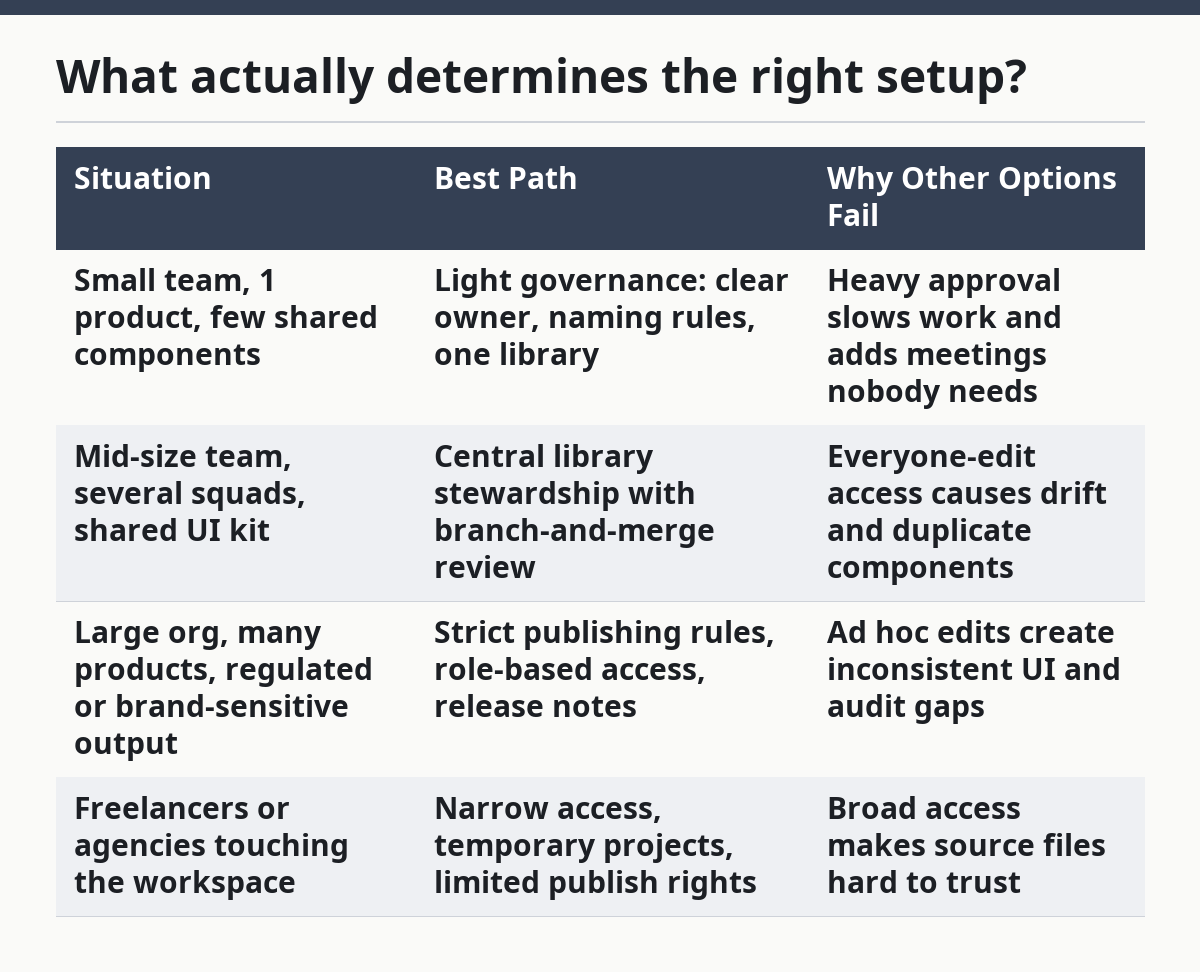
The right setup depends on how many people can edit shared assets, how often those assets change, and how risky a bad change would be. A 5-person team with one release train can keep this lighter than a 100-person org with multiple products.
Picture a design lead at a 12-person startup hearing requests for “simple rules” because anything heavier feels slow. Fair enough. But if the product has a design system, multiple squads, and a weekly release cadence, simple rules without ownership crack fast.
Use these factors to decide the level of control:
| Situation | Best Path | Why Other Options Fail |
|---|---|---|
| Small team, 1 product, few shared components | Light governance: clear owner, naming rules, one library | Heavy approval slows work and adds meetings nobody needs |
| Mid-size team, several squads, shared UI kit | Central library stewardship with branch-and-merge review | Everyone-edit access causes drift and duplicate components |
| Large org, many products, regulated or brand-sensitive output | Strict publishing rules, role-based access, release notes | Ad hoc edits create inconsistent UI and audit gaps |
| Freelancers or agencies touching the workspace | Narrow access, temporary projects, limited publish rights | Broad access makes source files hard to trust |
You do not need a perfect policy on day one. You need a policy that matches the blast radius of a bad edit. A typo in a marketing mockup is one thing. A changed form pattern used across 14 product flows is another.
Where should you start if the answer is fuzzy? Anchor on three questions:
- Who may edit shared libraries?
- Who may publish component changes?
- Who signs off before a release uses the updated library?
Once those are fixed, the rest gets much easier. Naming, folder structure, and cleanup rules stop being debates and start behaving like routine maintenance.
Quick check: If a bad change could spread across more than one team in an hour, you need stricter controls.
How should you set up permissions and ownership in Figma?
Set permissions so file owners, library maintainers, and contributors have different powers, not one all-access bucket. When everyone can do everything, nobody is accountable when a library breaks.
Picture a shared workspace where product designers, contractors, and managers all have the same editing rights. It looks open, but it also means anyone can rename layers, change components, or publish a bad update without a clear reviewer.
Start with role separation:
- Owners control the file or project and can assign access.
- Editors make day-to-day changes in active working files.
- Viewers can inspect, comment, and hand off without changing structure.
Then add stewardship on top of that. A design system library should have a named maintainer or small group that owns publishing decisions. That role is not the same as the person who made the file.
Here is a workable path for a governed setup:
- List every shared library, key project file, and template file.
- Name one owner for each shared file and one backup owner.
- Remove editor access from people who only need review or handoff access.
- Limit publishing rights for components and styles to maintainers.
- Create a review step for changes that affect shared tokens, variables, or components.
- Check access monthly and remove stale contractors or inactive contributors.
There is a trade-off here. Tight permissions reduce accidental damage, but they also make it harder for a fast-moving squad to experiment. Many teams keep a sandbox project open for rough work and reserve the governed library for stable assets. Clean in one place, loose in another.
If your org already uses identity management or access review policies, map Figma to those rules instead of inventing a separate universe. If not, keep the model simple and write it down in plain English.
Quick check: The person who can publish the button library should be named. If not, your permissions are too loose.
What is the cleanest workflow for library publishing and change control?
The cleanest workflow is a branch, review, publish, and announce loop with one clear owner for each step. Direct edits into the main library file, with no review, eventually ship a broken component or a surprise visual shift.
Picture an update to a card component used across onboarding, billing, and settings. One missing constraint or text style change can ripple through many screens, so this is not the place for casual edits.
A controlled workflow usually looks like this:
- Make the change in a branch or working copy.
- Compare the diff against the live library.
- Review the impact on all consumer files.
- Approve the change with design and, if needed, engineering.
- Publish with a short note that says what changed and why.
- Watch for breakage in the first round of downstream use.
Version naming matters too. Vague labels like “update” leave no trail. A better rule is to describe the change in human terms: spacing update, icon swap, input error state, or token refresh.
Speed is the trade-off against a looser workflow. A direct edit wins in the moment. But if the library is shared across several products, that speed comes back later as rework, debugging, and inconsistent UI.
Use the tighter version of this workflow when:
- the component is used in more than one product
- the component affects forms, navigation, or checkout
- the change touches variables, styles, or tokens
- downstream teams depend on stable patterns
Use a lighter version when the file is a sandbox, a concept deck, or a one-off prototype that will not be published.
Quick check: One publish could affect multiple products? Then you need a review step before release.
Which workflow breaks first, and how do you fix it?
Ownership gaps, library sprawl, and bad handoff habits are the first things to crack. Unmanaged, those three turn everything else into cleanup work.
Picture reviewing a design file and finding five versions of the same modal, each with slightly different spacing and text styles. That is usually not a creativity problem. It is a workflow problem that started when nobody stopped duplicate patterns from multiplying.
Use this table to pick the failure mode and the fix:
| Situation | Best Path | Why Other Options Fail |
|---|---|---|
| Duplicate components are everywhere | Merge into one canonical component set and deprecate copies | Leaving duplicates in place keeps downstream teams guessing |
| Files have no clear owner | Assign a single owner plus a backup for each shared file | Shared ownership with no name leads to stalled decisions |
| Handoff comments are ignored | Add a required review checkpoint before dev handoff | Freeform comments disappear into the file history |
| Teams keep reusing old patterns | Create a published library and archive old variants | People keep choosing the version they saw first |
| Release changes surprise developers | Publish notes and changelogs for shared updates | Silent changes show up as bug reports later |
“Be more disciplined” sounds nice and does nothing. Better to reduce the number of places where a wrong choice can hide.
Small org? One maintained library and one archive project may be enough. Larger org? Split by product line or platform so one team’s cleanup does not slow another team’s release.
Also watch the handoff layer. Designers often assume devs will spot the right file or version. Devs often assume the design file is final. If that assumption is wrong even once, both sides lose time.
Quick check: “The latest version” keeps coming up? Your workflow is failing at source control.
What should design ops own, and what should they leave alone?
Design ops should own the rules, not every decision inside the work. If design ops tries to approve every pixel, the process clogs; if it owns nothing, the system drifts.
Picture being the person everyone pings when a component name looks wrong, a file is missing, or a review stalls. That role works only if the boundaries are clear.
A good split looks like this:
- Design ops owns: naming rules, library structure, file hygiene, access review cadence, change logs, archival rules.
- Product design owns: design quality, component patterns, screen logic, interaction choices.
- Engineering owns: implementation fit, technical constraints, release readiness.
- Brand or content owners own: visual identity rules, copy standards, and message consistency.
This split matters because governance gets noisy when the wrong team owns the wrong decision. Design ops should not decide which tab pattern is best for a checkout flow; that belongs to the product and engineering pair. But design ops should decide where that approved tab pattern lives and how it gets reused.
A tight ownership model usually lowers meeting load. Once people know who owns what, fewer review loops bounce around the org.
Here is a practical rule: if a task is about structure, control, or reuse, design ops probably owns it. If it is about the user experience itself, design does. If it is about implementation cost or code fit, engineering does.
Monthly checks still matter. Exceptions are where the system changes shape without anyone noticing.
Quick check: If your design ops person is making product calls, the operating model is mixed up.
What do the edge cases look like?
Edge cases are the places where standard Figma advice breaks because the risk, speed, or team shape is unusual. Ignore these, and the policy looks good on paper but fails in real use.
Picture a merger, a contractor-heavy sprint, or a regulated workflow, and the normal “just use the library” advice suddenly stops working. That’s normal. Change the control level; don’t force the same rule everywhere.
-
Contractors need short-term access.
What changes: access risk goes up because people enter and leave quickly.
What to do instead: give project-only access, keep them out of core library publishing, and set a clear end date for permissions. -
Two products share one component set but release on different schedules.
What changes: one team’s changes can break the other team’s timing.
What to do instead: use a stable canonical library and branch changes behind review before they merge into the shared source. -
A marketing team and a product team both use Figma.
What changes: speed and control needs are different.
What to do instead: keep separate projects and separate naming rules, then share only the assets both groups truly need. -
A redesign is moving fast and the team wants to change everything.
What changes: governance can freeze progress if every file needs approval.
What to do instead: create a redesign sandbox, let concepts move quickly, then promote only approved patterns into the governed library. -
The org needs an audit trail for brand or regulated work.
What changes: “good enough” file history is no longer enough.
What to do instead: require publish notes, named approvers, and an archive path for old versions. -
You inherit a messy workspace with hundreds of files.
What changes: cleanup is a migration project, not routine housekeeping.
What to do instead: freeze new library publishing for a short window, classify files, retire duplicates, and move only the assets people still use.
The temptation is to solve edge cases with one more rule. A better move is to create a separate lane for the unusual case and keep the main lane clean.
Quick check: “This is different” comes up more than once a week? You need a special path for exceptions.
What tools and standards matter outside Figma itself?
Tools and standards outside Figma matter because governance lives in the handoff, not only inside the canvas. Strong file rules with weak naming, review, or release habits still leave the system shaky.
Picture Figma on one side and tickets, docs, and releases on the other, with design, product, and engineering trying to coordinate between them. The friction usually shows up at the edges: version notes, approval logs, and the place where component decisions get recorded.
The most useful standards are the boring ones:
- a naming convention for files, pages, and components
- a release note format for library changes
- a definition of done for design handoff
- a changelog for shared components
- a file archive rule for stale work
For outside tools, many teams pair Figma with Jira, Linear, Confluence, Notion, or a ticketing system already in use. The exact tool matters less than the habit: record the decision where the next person will look for it.
Two authoritative references are worth keeping nearby:
- Figma’s own help center on team libraries and permissions, which explains how library access and publishing work.
- The W3C Design Tokens Community Group, which is useful if your workflow maps Figma decisions to tokens used in code.
The trade-off is plain: standards add structure and also add upkeep. A naming rule no one uses is dead weight. Keep the standard short enough that people can follow it without opening a handbook every time.
Quick check: Handoff notes live in three different places? Your workflow standard is too loose.
FAQ
How much governance does a small Figma team need?
A small Figma team usually needs only a few rules: one owner for shared files, one library source of truth, and a simple approval path for published components. If the team has one product and low change risk, a light setup is enough. If shared assets spread across multiple features, add a review step before publishing.
Should every file have a strict approval workflow?
No, every file does not need the same level of control. Working files, prototypes, and sandbox concepts can move faster than shared libraries or released design systems. The approval path should get stricter as the blast radius gets larger.
What is the biggest sign the workflow is broken?
The biggest sign is repeated confusion over which version is current. If people keep asking for “the latest” or copying old patterns by mistake, the source of truth is unclear. Duplicate components and silent publishes are usually part of the same problem.
Is branching always necessary in Figma governance?
No, branching is not always necessary, but it helps when shared components affect multiple teams or products. If the file is low risk and the group is small, a simpler review flow may be enough. Use branching when the cost of a bad publish is high.
Who should own Figma governance?
Figma governance should sit with design ops or a similar function, but not as a solo job. Product design, engineering, and brand or content stakeholders each own part of the decision set. The governance owner keeps the system consistent; the other teams keep the system useful.
Drafted with AI; not yet reviewed by a person.