Last updated: November 19, 2026
If your team has both design tokens and Figma styles, the fix is to make tokens the source and Figma styles the mirrored layer. This article on How to Map Design Tokens to Figma Styles Without Creating Duplicate Sources of Truth keeps color styles and text styles useful in the file without turning Figma into a second system of record. For a broader reference point, Figma documents style libraries in its help center, and the W3C Design Tokens Community Group is the main standards effort for tokens. See Figma Help Center and the W3C Design Tokens Community Group.
The steps below show how to map names, sync updates, and keep libraries from drifting apart.
Key takeaways
- Tokens should own the raw values; Figma styles should expose those values in the editor.
- Mirror token names into Figma style names so handoff stays readable.
- Map by semantic role first, not by hex code or font file.
- Keep one library as the published surface, then update styles from the token source on a set schedule.
- Stop duplicate sources of truth by making local style edits temporary, not canonical.
What source of truth should win?

Design tokens should win, and Figma styles should mirror them. That rule can help prevent a color like Blue/500 from living one life in code and a different life in Figma; if the decision matters, consult your design system owner or a technical professional, and check the token governance guidance from the W3C Design Tokens Community Group.
Picture this: you open a file with 40 color styles, six of them named slightly differently, and one brand blue that has two hex values. You do not need another naming debate. You need a rule for where truth lives, what gets published, and what only exists as a view.
The clean split is simple:
- Tokens hold the canonical values and names.
- Figma styles present those values to designers.
- Libraries distribute the approved styles to files and teams.
This matters because Figma styles are easy to create and easy to drift. A designer can duplicate a style, nudge a hex code, and keep working. That is useful for speed and bad for governance. The style becomes a fork, not a reference.
A one-way model is usually the safest fit: token changes flow into styles, not the other way around. That does not mean designers lose control. It means they control usage, pairing, and layout decisions, while the source values stay stable.
Some teams get this backward. They try to make the style name the authority and the token file the export artifact. That usually breaks down the first time a product line needs a brand update, or a dark theme adds a second semantic layer. The team then spends hours hunting mismatches.
Use this split instead:
- Pick one token set as the canonical source.
- Map each token to one Figma style name.
- Publish styles from a shared library.
- Block ad hoc style creation except for temporary work.
- Re-sync on a fixed cadence, such as every design system update.
That gives you a clear chain from token to style to file.
How do you map tokens to Figma styles without duplicates?
Map tokens to Figma styles by semantic role, then keep one style per role. That means color.text.primary becomes one text or color style, not three versions that all mean “almost black.”
Picture this: you’re opening a component library and trying to decide whether Gray/900, Neutral/900, and Ink/Primary are the same thing. If a teammate cannot answer in 10 seconds, your naming has already failed.
The mapping works best when you separate three layers:
- Foundation token: the raw value, such as a color or font family.
- Semantic token: the role, such as text, surface, border, or accent.
- Figma style: the named editor surface designers pick from.
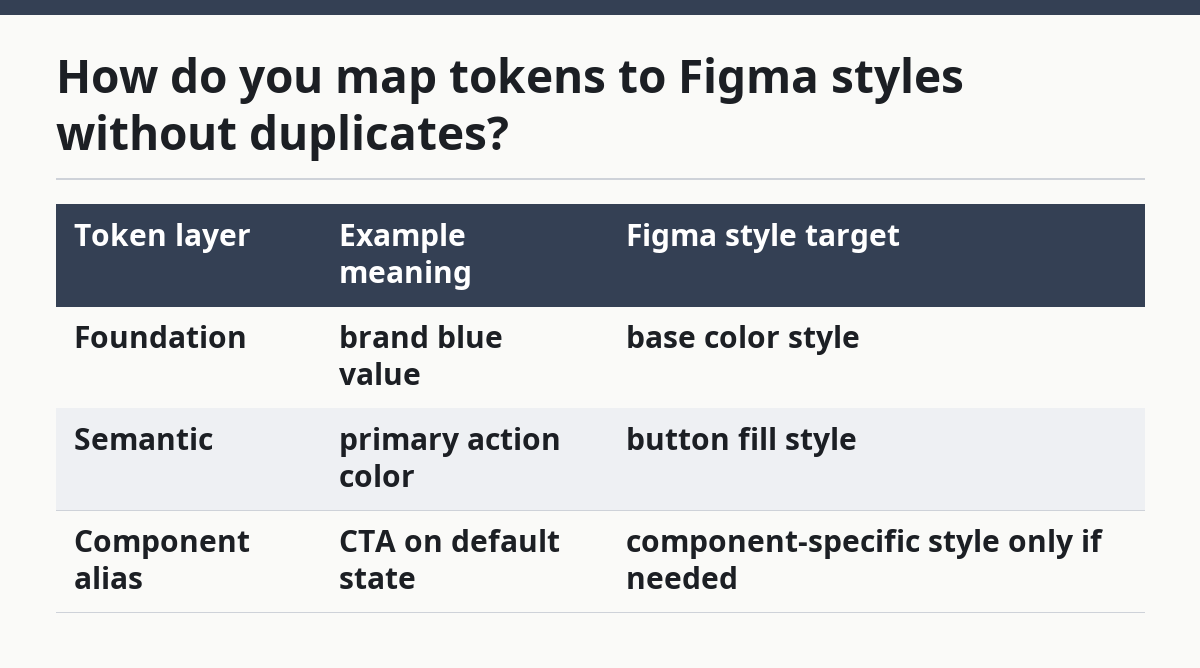
A practical mapping table looks like this:
| Token layer | Example meaning | Figma style target |
|---|---|---|
| Foundation | brand blue value | base color style |
| Semantic | primary action color | button fill style |
| Component alias | CTA on default state | component-specific style only if needed |
Use component-specific styles sparingly. If every button state gets its own permanent style, you will create a second catalog of almost the same thing. That is how duplicate sources of truth begin.
The better rule is:
- Create global styles for common semantic use.
- Use component styles only when the component truly needs a distinct token-to-style path.
- Avoid style names that expose raw hex values.
- Avoid one-off local styles for page-specific tweaks unless they are clearly temporary.
For color, the mapping should usually point to semantic names such as Color/Text/Primary or Color/Surface/Subtle. For type, map to styles such as Type/Body/Regular or Type/Heading/H2. Those names describe use, not implementation detail.
Here’s the catch: if your token names are purely technical, like blue-600 and slate-50, designers will still use them, but they will lose the meaning. The style layer should translate that into design language the team can read.
Set up the sync so Figma stays in step with tokens

Set up sync by publishing styles from tokens on a fixed process, not by editing styles by hand every time. Manual edits are fine for a quick mockup; they are a bad long-term sync method.
Picture this: you’ve changed a token in your source file, but the Figma library still shows the old style value. Now the file lies, and every new frame uses yesterday’s decision. That delay is where handoff errors start.
A workable sync flow looks like this:
- Change the token in the source system.
- Regenerate the Figma style set from that source.
- Publish the updated library.
- Reopen affected files and relink if the library version changed.
- Retire any orphaned local styles that duplicate the published ones.
If your team uses a plugin or automation to write styles into Figma, keep the rules strict. The tool should map the approved token list into the approved style list, not invent new names on the fly. If the same token produces two styles, the automation is wrong or the naming map is missing.
The sync process also needs a release rhythm. Weekly is common for active systems; monthly works when change is slower. The exact cadence matters less than the fact that the team knows when styles are safe to rely on.
Use a short publish checklist:
- Confirm the token name still points to the same role.
- Confirm the Figma style name did not drift.
- Confirm deleted tokens are removed from the library.
- Confirm new styles are added only when a role really exists.
That last point matters. If a token gets renamed from color.brand.primary to color.action.primary, the Figma style should follow the semantic change only if the use changed too. If the value changed but the role did not, the style name should stay stable.
What should Figma style names look like?
Figma style names should read like the token system, but in designer language. That usually means slash-separated groups, such as Color / Text / Primary, not a giant sentence or a raw code name.
You are searching the styles panel for a heading treatment and there are 87 entries. Half of them are named by font weight, half by component, and one by a person’s initials. That is not a naming system. That is a pile.
A good naming scheme does three jobs at once:
- It tells a designer what the style is for.
- It lets the token map stay predictable.
- It keeps search and filtering usable in large libraries.
A practical pattern is:
- Category: Color, Type, Effect, Spacing if used
- Role: Text, Surface, Border, Heading
- Variant: Primary, Secondary, Subtle, Strong
- State: Default, Hover, Disabled if the system needs it
For example:
Color / Text / PrimaryColor / Surface / ElevatedType / Body / RegularType / Heading / H2
Keep the name stable even if the underlying token value changes. If you rename a style every time the brand palette changes, you force designers to relearn the library and you break component references more often than needed.
There is one trade-off. Very strict names can feel repetitive inside Figma. That’s the price of consistency. The reward is that a handoff designer, a product designer, and a front-end engineer all read the same label and mean the same thing.
Do not mirror token names exactly if the token names are technical noise. semantic.text.default is fine in a token file. In Figma, Color / Text / Primary is easier to use. The map should be legible at the point of work.
How do you keep libraries from drifting apart?
Keep libraries from drifting apart by limiting who can publish styles and by reviewing the map as a system, not a file. If anyone can create or repoint styles at any time, drift will return fast.
Picture this: two designers edit the same library in different branches of thought. One adds a new neutral scale. The other duplicates an old body style because it was “close enough.” Three weeks later, the file has two ways to do the same thing.
That is why governance matters.
Use these controls:
- One publishing owner for the style library.
- One naming map from token to style.
- One review step before styles are published.
- One rule for local overrides: temporary only, and never promoted without review.
A good governance checklist includes these questions:
- Does this style already exist under another name?
- Is this style tied to a semantic role or just a visual accident?
- Will this style still make sense after the next token update?
- Is the style library the same in every major product file?
You do not need to freeze design work to do this. Designers can still experiment in a branch or a local file. The difference is that experiments stay experiments until someone maps them back to the token system.
Watch for these common mistakes:
- Duplicated neutrals that differ by 1 or 2 hex steps but share the same job.
- Component-only styles that should have been global styles.
- Local style edits made to fix one screen and never cleaned up.
- Renamed styles that break search habits and make handoff slower.
The cost is simple: more review time, more confusion, and more mismatches between Figma and code. The fix is also simple: let the token map decide what becomes a published style.
If you need the larger governance model behind this, the hub on Design tokens implementation and governance — The Complete Guide is the right next stop. You can also review the W3C Design Tokens Community Group drafts and Figma’s style-library documentation for the underlying mechanics.
What belongs in handoff, and what should stay in tokens?
Handoff should show the Figma style name, not the raw token file, while the token source stays behind the curtain. Designers and developers need the same label; they do not need two competing ledgers.
Picture this: a developer inspects a component and sees a style named Color / Text / Primary. That is enough to know what was intended. They should not have to chase a hidden second name that only exists in the token repository.
Use handoff to expose:
- Style names
- Style categories
- Which files or components use them
- Which styles are deprecated
Keep out of handoff:
- Unapproved local styles
- Duplicate aliases with no owner
- Temporary design-only experiments
- Implementation noise that does not affect the design decision
A simple handoff note can do a lot of work. For example, “This component uses the published library style Color / Text / Primary; local overrides are not allowed in release files.” That sentence sets the rule without a lecture.
The boundary matters because handoff is where duplicate sources of truth become expensive. If a developer sees one label in Figma and a different one in code, they have to guess which is current. Guessing is where bugs start.
Use a short review habit before handoff:
- Open the component.
- Check the applied style name.
- Confirm it exists in the published library.
- Confirm there is no local duplicate with the same purpose.
- Confirm the style still matches the token map.
That takes minutes. It saves hours later.
When should you not force a direct token-to-style match?
Do not force a direct match when the token is a machine concern and the style is a design concern. Some token names should stay technical, and some style names should stay human.
Picture this: a motion token, a platform-specific alias, or a very low-level spacing value ends up as a visible style name. The file becomes harder to scan, not easier. A direct mirror only helps when the style is something designers actually pick.
Cases where a strict 1:1 match can fail:
- A token exists only for code logic.
- Two tokens map to one visible design choice.
- One style needs a friendly name, but the token name is technical.
- A component uses a local alias that should not be published globally.
That does not mean the map is broken. It means the map needs a layer boundary. The token can stay precise; the style can stay usable.
A good test is this: if a designer would never choose the name in the style picker, it probably does not belong there. Use a cleaner style label and keep the technical token under it.
The file should not mirror every token detail just because the pipeline can support it. Figma is a working surface, not a database dump. Keep the surface readable, keep the source canonical, and let the two layers do different jobs.
Should Figma styles or tokens be the source of truth?
Tokens should be the source of truth, and Figma styles should mirror them. That keeps one canonical value set for design and code, while Figma stays a usable editor surface. If you let styles become the source, local edits and duplicates can spread fast.
How do you avoid duplicate color definitions in Figma?
You avoid duplicate color definitions by mapping one semantic token to one published color style and banning equivalent local copies. The practical fix is a naming map, a single library owner, and regular cleanup of orphaned styles. If two styles mean the same job, one of them should go.
Can Figma styles mirror token names exactly?
Yes, but only when the token names are already readable for designers. Exact mirrors work better for semantic names than for technical ones like code-oriented aliases. In many teams, a readable Figma style name is the better choice because it helps search, handoff, and governance.
Drafted with AI; not yet reviewed by a person.