Last updated: November 20, 2026
Privacy: related questions — the questions that matter most
Quick answer: the 4 privacy questions that matter most are what data is collected, who gets it, how long it sticks around, and what you can actually turn off. If a policy or app cannot answer those four in plain language, treat that as a warning sign and, if the stakes are high, consult a privacy professional; the FTC’s consumer privacy guidance and the EDPB’s transparency guidance are good starting points: https://www.ftc.gov/business-guidance/privacy-security and https://www.edpb.europa.eu/our-work-tools/our-documents_en
Key takeaways

- The fastest privacy win is not reading every line; it is finding the data categories, sharing rules, and retention period.
- Privacy policy, privacy settings, and private browsing do different jobs. One does not replace the others.
- If a service asks for contacts, location, or camera access, the real question is whether that access is necessary for the feature you want.
- “Incognito” only changes what the device stores locally. It does not make the service invisible to the site, the app, or your internet provider.
- Walk away when a product hides its data use, makes opt-outs hard, or asks for more access than the feature needs.
What does privacy actually mean here?
Privacy means control over personal data, not total invisibility. In practice, that means knowing what a service collects, how it uses that data, and whether you can limit sharing, tracking, or storage under rules such as the GDPR or CCPA/CPRA. If a company cannot explain those basics in one short page, the privacy risk is usually higher than the feature is worth. For background on those rules, see the privacy policy basics and privacy settings pages.
The useful questions are simple: what is collected, why is it collected, who sees it, and how long is it kept. Those four questions matter more than a long policy written in legal language. They also matter more than a “we value your privacy” banner, which tells you almost nothing.
For a person trying to decide whether to sign up, a practical test is blunt: would I still use this if it needed less data? If the answer is yes, the service may be privacy-friendly enough. If the answer is no, the service is probably built around data collection, not minimal access.
Should I read the privacy policy or change the settings first?
Change the settings first, then read the privacy policy if the service still looks useful. The settings decide what can happen now; the policy tells you what the company says it may do later. That order saves time and catches the biggest leaks faster.
| Criteria | Privacy policy | Privacy settings | Winner for this condition |
|---|---|---|---|
| Speed | Slower; a full policy can run many pages | Faster; the main switches are usually in one menu | Privacy settings, when you need a quick first pass |
| What it answers | Who gets data, why it is used, and how long it is kept | What you can turn off right now | Privacy policy, when you want the data map |
| Best for | Checking sharing, retention, and legal rights | Reducing tracking, recommendations, or visibility | Depends on whether the problem is legal use or account exposure |
| Weak spot | Can be vague or written for lawyers | May not cover data the company still collects behind the scenes | Neither, if the service is hiding key facts |
| How much control you get | Indirect; you learn the rules, not the switches | Direct; you change a setting in 10 seconds or less | Privacy settings, for immediate control |
| Best signal of trust | Clear retention period and sharing list | Simple opt-outs for ads, location, and contacts | Privacy policy, if it is clear and specific |
| Risk of false comfort | High, if you read it and think that means protection | Moderate, if you assume one switch fixes everything | Privacy settings, because they are easier to miss |
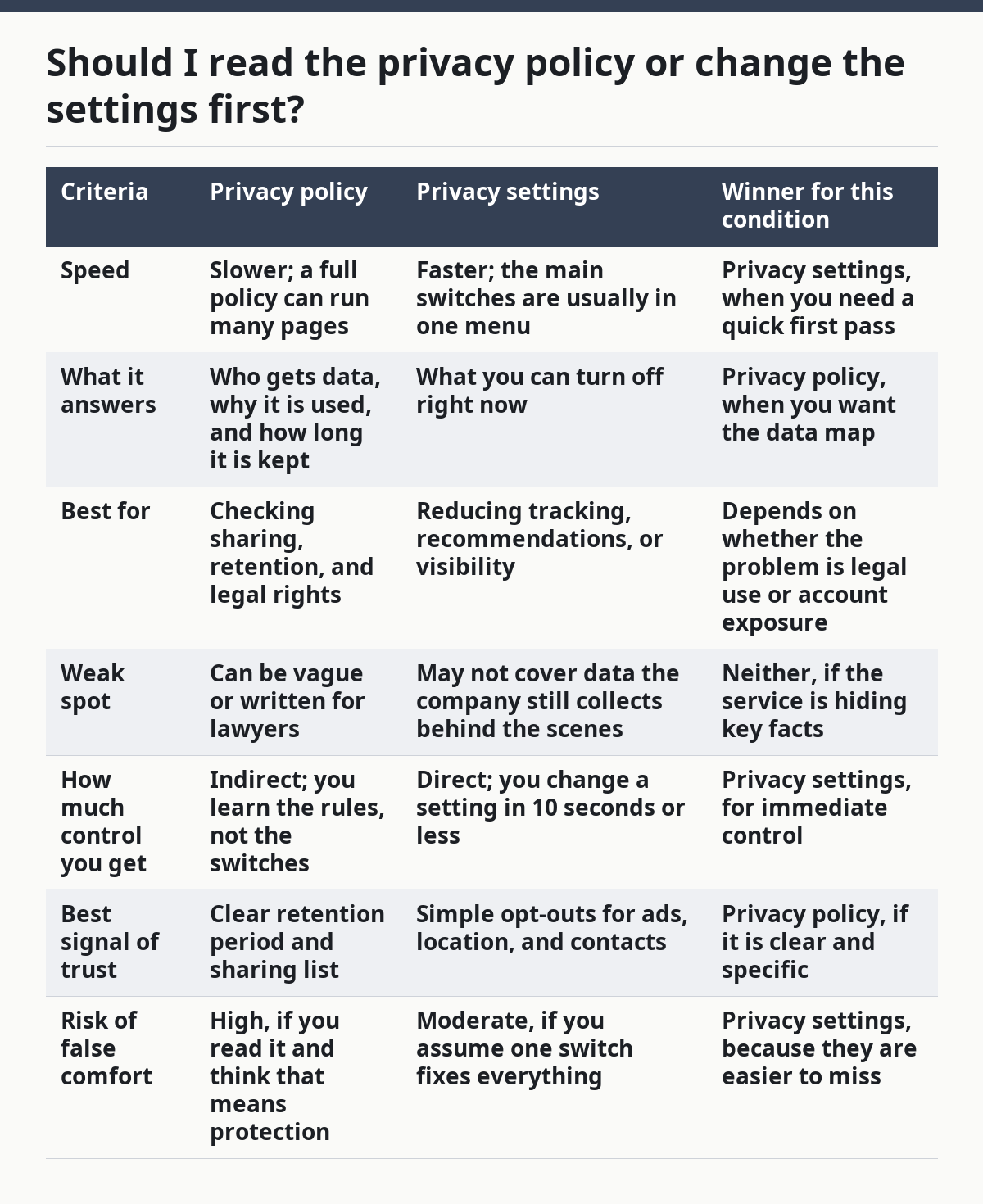
The short version is this: settings win for immediate action, and the policy wins when you need to know the rules before you trust the service. A privacy policy alone is not protection. A privacy setting alone is not a full answer either. For a quick walkthrough, see incognito mode and data deletion.
The weak point of the policy is that it often reads like permission rather than restraint. The weak point of the settings menu is that it can be missing the one switch you want, like data sharing with third parties. If you only have 2 minutes, change the settings first and then check the policy for retention and sharing.
What does a privacy policy actually tell you?
A privacy policy tells you what the company says it collects, why it collects it, and who it may share it with. That is the core value of the document, and it is why the policy matters even when the language is dense. It is not a promise of safety; it is a disclosure of the company’s rules. The FTC and EDPB both emphasize clear, accessible disclosure.
The most useful parts are usually near the sections labeled “information we collect,” “how we use information,” “sharing,” and “your choices.” Those sections often reveal whether the service uses data for ads, analytics, or product improvement. If a policy mentions “partners,” “affiliates,” or “service providers” without naming limits, that is a sign to slow down.
A generic article often misses the retention question. Ask how long the service keeps deleted data, logs, backups, and account history. A company can stop showing something to other users and still keep copies for a long time. That difference matters more than many people expect.
What can privacy settings really fix?
Privacy settings can reduce exposure, but they cannot erase data the service already has or guarantee that no data leaves the platform. They are best at cutting off the obvious stuff: profile visibility, ad personalization, location sharing, contact syncing, camera and microphone permissions, and search indexing. That makes them powerful, but only within the limits of the app or browser.
The biggest win is usually permission control. If an app asks for contacts, location, or camera access and the feature does not need them, deny it. That decision is often more valuable than any long policy review. It also forces the product to work with less data, which is the whole point.
The weakness is that settings can look complete while the service still collects background data. Some products keep logs, device identifiers, or usage records even after you turn off visible tracking options. That is why the settings menu should be treated as a control panel, not a guarantee; for high-stakes decisions, consult a privacy professional or review official guidance before relying on it.
Is incognito mode enough for privacy?
No, incognito mode is not enough for privacy because it mainly stops your browser from saving local history on that device. It does not hide your activity from the website, the app, your employer’s network, or your internet provider. That is a common mistake, and it is the one that causes the most false confidence.
Incognito mode is still useful in a narrow case: shared devices. If you want to avoid leaving local browsing traces on a family computer or a borrowed laptop, it helps. It also keeps some cookies from sticking around after you close the window, which can reduce session carryover.
The limit is simple. If the goal is real privacy from the service itself, or from tracking at the network level, incognito mode is not the tool for the job. Use it for local cleanup, not as a shield.
What should I ask before I share my data?
Ask four questions before you hand over any personal data: what is required, what is optional, who sees it, and what happens if I say no. Those four questions will catch most of the problems that matter in the first 30 seconds. They are also easier to answer than a 20-page policy.
A practical checklist looks like this:
- Do I need to give this at all, or is it just convenient?
- Can I use the service without contacts, precise location, or full birth date?
- Is this data used only for the feature I want, or also for ads and profiling?
- Can I delete it later, and does deletion mean removal or just hiding it?
If a service cannot answer those questions clearly, that is not a small issue. It means the product is asking for trust before it has earned it. In privacy terms, that is usually the wrong order.
When should I walk away from a service?
Walk away when the service asks for more data than the feature needs, hides the opt-out path, or makes deletion hard. Those are the clearest signs that privacy is not a priority in the product design. A service can still be useful and still be the wrong choice for someone who wants low-data use.
Another warning sign is vague sharing language. If the policy says data may be shared with “partners” but does not explain the purpose, scope, or limits, the user is being asked to accept uncertainty. That may be acceptable for a throwaway account, but it is a bad trade for anything tied to identity, location, or communication history.
The cleanest exit test is simple: if you need 3 or 4 separate steps to stop a use that should be optional, the product is probably built to keep data flowing. That is not always a sign of malicious intent. It is still a reason to look elsewhere.
When does the answer change?
The answer changes when the data is sensitive, the service is essential, or the harm from a mistake is high. A casual social app and a health, finance, or school account do not deserve the same privacy handling. The more sensitive the data, the less patience there should be for vague language or broad permissions.
It also changes when the user has a legal right to ask for access, correction, deletion, or restriction under rules such as GDPR or CCPA/CPRA. Those rights do not solve everything, but they give a real path to push back. If the service is outside those rules, the user has fewer formal options and should be even more cautious.
In a few cases, privacy loses to necessity. A delivery app may need an address; a messaging app may need a phone number or contact permission to work as expected. The right response is not “never share anything.” It is “share the minimum needed and no more.”
What are the privacy questions people forget?
The questions people forget are the ones about backups, third parties, and deletion lag. A deleted file may still live in backup systems for some time. A shared address may still sit in an ad or analytics system. A closed account may still leave logs behind for a while, depending on the service’s policy.
People also forget that privacy is not only about what the company does. It is about what other users can see, what the device stores locally, and what the network can observe. That is why one switch rarely solves the whole problem. The better approach is layered: permissions, settings, account choices, and then the policy.
If you only remember one line, make it this: privacy is not a promise, it is a set of controls. The controls that matter most are the ones that reduce collection at the source.
FAQ
How do I know if a privacy policy is bad?
A bad privacy policy is vague about sharing, unclear about retention, and full of broad phrases like “may collect” without explaining why. If you cannot find what is collected, who receives it, and how long it is kept within a few minutes, that is a practical red flag.
Is turning off ad tracking enough?
Turning off ad tracking helps, but it is not the same as stopping all data collection. Many services still keep account data, device data, or usage logs for operational reasons. The safer move is to turn off ad tracking and then check the rest of the settings and policy.
Can I trust private browsing for sensitive searches?
Private browsing helps keep the search off the local device history, but it does not hide it from the site or the network. For sensitive searches, that means it is only a partial step. If the topic is truly private, use stronger controls than a private window.
What is the single best privacy habit?
The single best habit is to give the minimum data the service needs and nothing extra. That means skipping optional fields, denying unnecessary permissions, and checking settings before the first use. It takes less than 5 minutes in many cases and usually matters more than reading every line of legal text.
Drafted with AI; not yet reviewed by a person.