
Last updated: November 19, 2026
Key Takeaways
- Token metadata should answer three core questions: owner, platform, and usage.
- Field design should separate machine-readable keys from human-readable notes.
- Ownership metadata should identify the accountable team or person.
- Platform metadata should prevent tokens from being used in the wrong output or device class.
Token metadata is the extra information attached to a design token that tells a team who owns it, where it runs, and how it should be used. This page shows how to define token metadata for ownership, platform, and usage, and it shows what to record, what to skip, and how to keep the fields useful instead of bloated.
You need a clear metadata scheme or your token catalog turns into a pile of names with no one accountable for them. The steps below settle ownership fields, platform flags, usage notes, documentation fields, and lifecycle state.
What token metadata needs to answer

Token metadata should answer three questions: who changes this token, which platforms can consume it, and what the token is for. If a field does not help answer one of those questions, it usually belongs in documentation, not metadata.
For a catalog with 200 entries, that usually means the same small set of jobs: ownership, platform, usage, and lifecycle. That is enough to keep the record useful without turning it into a wiki.
A practical metadata set usually includes:
- Owner: a person, team, or service name
- Platform: web, iOS, Android, email, or another target
- Usage: allowed contexts, such as button text or surface background
- Lifecycle: active, deprecated, or experimental
- Docs link: a pointer to the source of truth
If you add fields beyond that, the reason should be obvious. A token with no owner is hard to fix. A token with no platform flag is easy to misapply. A token with no usage note gets copied into the wrong component and spreads the mistake.
A narrow field set is usually easier to maintain than a broad one. Start with the fields that stop bad edits, then expand only when your build or review process actually needs more detail.
How do you define token metadata fields?
You define token metadata fields by deciding which fields must be machine-readable and which can stay human-readable. Start with 5 to 7 fields, keep names short, and use the same shape across every token family.
A field is only useful if another system can act on it. A reviewer can read a prose note, but a linter, export script, or token browser needs a stable key. That is why token metadata usually works best as simple key-value pairs.
Use this order when you design the schema:
- List the decisions the metadata must support. For example, route ownership requests, filter by platform, or warn on deprecated tokens.
- Choose one canonical field name for each decision. Use
owner,platform,usage,status, andsourcerather than long labels. - Define allowed values.
ownermight be a team slug, not a free-text sentence. - Separate required from optional fields. Required fields should be the ones that block mistakes if they go missing.
- Keep descriptions short. One line per field is enough in most cases.
- Document examples. A single token example helps more than a long policy paragraph.
A structured field set is easier to scan than a clever one. It looks the same in every file, every export, and every review screen.
A simple field model
| Field | What it should say | Good shape |
|---|---|---|
owner |
Who maintains the token | Team slug or named group |
platform |
Where the token applies | One or more platform tags |
usage |
Where it may be used | Short allowed-context note |
status |
Whether it is current | Active, deprecated, experimental |
description |
What it means | One plain sentence |
source |
Where the rule came from | Doc title or URL reference |
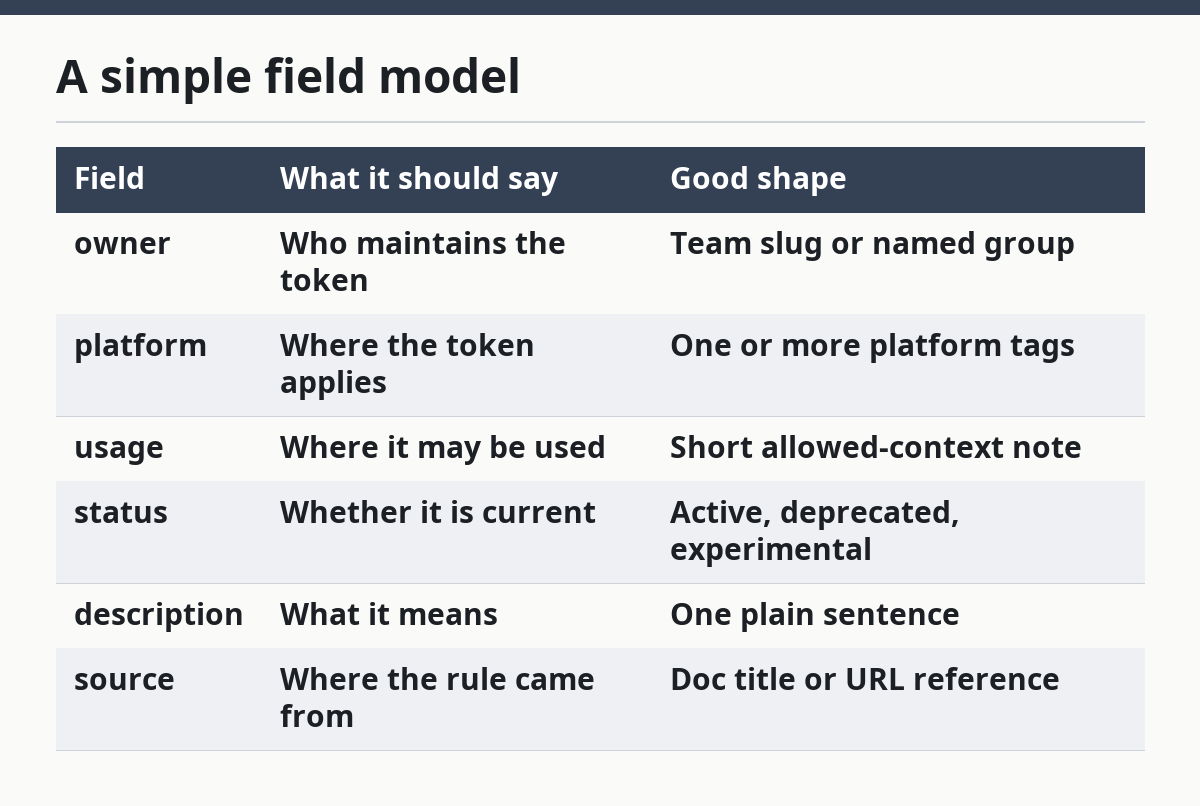
If your tooling supports tags, use tags for filtering and short notes for human reading. If your tooling supports only JSON, keep the schema flat. Nested objects are useful only when your export pipeline already expects them.
Ownership metadata: who is responsible for a token?

Ownership metadata should point to the team or person who can approve a change, answer a question, or fix a broken token. If the owner is vague, nobody feels responsible when the token is wrong.
When two people think the other group owns the color token that broke a mobile screen, ownership metadata ends that guessing game. It should be specific enough that someone can act within one working day, not after a Slack scavenger hunt.
For ownership, the most useful fields are:
- Owner team: the primary accountable group
- Backup contact: the second place to go when the owner is out
- Steward: the person who curates the token set, if your org uses that role
- Last reviewed: the date the ownership assignment was checked
- Decision path: where ownership disputes go
The mistake to avoid is stuffing job titles into the owner field. “Design” or “Engineering” is too broad to help. A better field might be design-system-core or mobile-foundation. That gives the reader a real starting point.
Another mistake is using personal names as the only owner. People leave, change teams, or go on vacation. Team ownership lasts longer and is easier to automate.
Use this rule:
- Owner field = team or service
- Contact field = named person or group alias
- Escalation field = where unresolved issues go
That split keeps the metadata stable. It also makes audits easier when a token has been untouched for 90 days or longer and nobody remembers why it exists.
Ownership fields that work in practice
| Field | Purpose | Example shape |
|---|---|---|
owner |
Main accountable team | design-system-core |
contact |
Day-to-day contact | shared team alias |
backup |
Backup owner | another team alias |
reviewedAt |
Freshness check | ISO date string |
escalation |
Dispute path | governance board name |
A token without ownership metadata is harder to maintain, harder to trust, and easier to duplicate by accident. That cost shows up later in cleanup work, not at the moment of creation.
Why add platform metadata to tokens?
Platform metadata keeps a token from being applied to the wrong output, the wrong renderer, or the wrong device class. It tells your pipeline whether a value belongs in web CSS, iOS assets, Android resources, email templates, or all of them.
The truth is, platform support gets messy fast. A spacing token may work everywhere, but a shadow token or font token often does not. Platform metadata gives you a place to state that difference without hiding it inside comments.
The most useful platform fields are:
- Platform name:
web,ios,android,email - Support level: supported, partial, or not supported
- Transform rule: how the token exports for that platform
- Fallback: what to use when the platform cannot render it
- Exception note: where the normal rule breaks
Do not use platform metadata to describe brand intent. Keep it technical. If a token works on web but not in email, say that plainly. If a token needs a transform because the target platform wants a different unit, record the transform path, not a paragraph about style philosophy.
A good platform flag also helps with release safety. If a token is marked unsupported on android, your generator can skip it or warn about it before the handoff. That is better than shipping a silent mismatch.
Platform metadata also helps teams split a token catalog into views. Designers can look at one set. Engineers can export another. The metadata stays in one source, but each platform sees only the slice it can use.
What should usage metadata say?
Usage metadata should say where a token is allowed, where it is banned, and what kind of component it belongs to. That is the difference between a token that guides use and a token that quietly causes misuse.
When two surface colors look similar but behave differently in cards, modals, and banners, usage metadata can say one is for large surfaces only, while the other is safe for accent areas. That short note can help prevent design drift.
Good usage metadata usually covers:
- Allowed contexts: button background, text, border, icon fill
- Disallowed contexts: do not use for body text, do not use for alerts
- Semantic role: surface, content, action, feedback
- Contrast note: if the token depends on another value for legibility
- Example component: a named pattern, such as primary button or input label
Keep the note short enough that someone will read it while they are building. One sentence beats a half page. If the usage rule needs three paragraphs, the rule itself may be too vague.
A useful pattern is to write usage as a constraint:
- “Use for interactive controls only.”
- “Do not use for status chips.”
- “Safe on dark surfaces.”
- “Reserved for large background shapes.”
That style makes the rule easy to scan. It also works well in token browsers and code comments.
Usage metadata is not the same thing as documentation. A docs page can explain why the rule exists. The metadata field should still be short and machine-friendly.
How do you document token ownership?
You document token ownership by tying each token to one accountable team, one contact path, and one review date. That trio is enough to keep the catalog from drifting into orphaned values.
Ownership documentation fails when it tries to act like a policy essay. The useful version is small and repeatable. A reader should be able to find the owner in 10 seconds, not search across three docs.
Use these steps:
- Assign one owner per token or token group. Pick the team that can approve changes.
- Record a contact alias. Use a team inbox or channel, not just a personal account.
- Add a review date. Use a standard format like
YYYY-MM-DD. - Store the rationale in one sentence. Explain why that team owns it.
- Link to the decision record. Point to the design system page or governance note.
- Audit the field on a schedule. A quarterly check is usually enough for most systems.
If your token set is large, ownership works better at the group level than at the single-token level. A family of spacing tokens can share the same owner. A single exception token may need its own entry if it crosses team boundaries.
Be careful with stale ownership. When a team reorganizes, old labels hang around and confuse everyone. That is why lastReviewed matters as much as owner. The metadata should show not only who owns the token, but whether that assignment is still current.
If your system already has design token documentation, use that page for context and keep the metadata field itself concise. This page belongs with your broader guide to design tokens implementation and governance, but the metadata entry should stay simple.
Which lifecycle state fields are worth adding?
Lifecycle state fields are worth adding when tokens can be created, retired, or kept only for backward compatibility. A plain status field is enough for most systems.
When you find three values that all point to the same visual result, lifecycle metadata helps show which one is still preferred and which one should be removed later. Status turns that guess into a plan.
The most common lifecycle states are:
- Active: the token should be used
- Deprecated: the token still exists, but new work should avoid it
- Experimental: the token is under review and may change
- Removed: the token should not appear in new exports, if your system keeps a record
You can also add:
- Replacement token
- Deprecation date
- Removal target
- Migration note
Do not overbuild this field. If your team cannot act on a deprecated token differently from an active one, more lifecycle labels will not help. A simple status plus a replacement pointer is usually enough.
Lifecycle metadata is useful because it creates a clean path for change. A designer sees what is safe. An engineer sees what to replace. A maintainer sees what can be removed during the next cleanup pass.
One solid pattern is to pair lifecycle state with a short migration note:
- “Deprecated; use
color.brand.primaryinstead.” - “Experimental; do not ship in production UI.”
- “Active; supported on all current platforms.”
That is enough to keep the token readable without turning the field into a mini article.
A practical way to set the whole metadata schema
You set the whole schema by building the smallest version that supports review, export, and cleanup, then proving each field earns its place. A simple schema with 6 fields is often enough to start.
It helps to treat metadata design like any other controlled change: define the shape, assign owners, then publish examples for the team that will maintain it.
Start with this sequence:
- Inventory current tokens. Note which tokens already have owner, platform, or usage data.
- Choose the required fields. Keep the first version small:
owner,platform,usage,status,description,source. - Write allowed values. Define the exact values for each enumerated field.
- Add one canonical example. Show how a single token should look in JSON, YAML, or your token tool.
- Check tool compatibility. Make sure your build pipeline can read the fields without custom hacks.
- Set a review cadence. Quarterly is common for maintenance, but pick what your team can sustain.
- Trim anything no one uses. If a field does not help routing, filtering, or approval, cut it.
A good schema is not the one with the most fields. It is the one your team keeps accurate.
Drafted with AI; not yet reviewed by a person.